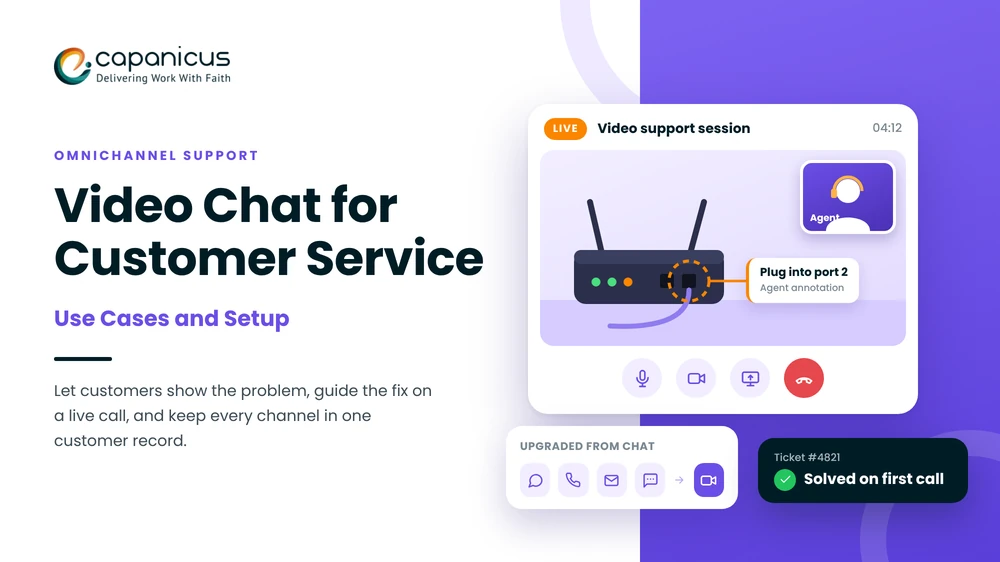
Understanding customers becomes simple when they can show agents their problems rather than explain them. Say we have a customer who has difficulties installing a product, has technical issues, or is trying to order a complex service; in this case, they may take several minutes explaining something that the agent could grasp in a few seconds by video call. That is when video chat for customer service becomes relevant. It gives support teams an easy way to communicate: customers can show the issue, and agents can show the fix.
Nevertheless, video technology works best when it links to other customer service tools. Companies need a solution that connects video calls, voice calls, online chats, WhatsApp, emails, and SMS messages in a single environment where they can manage customer information, including profiles, tickets, and follow-ups. This guide covers the main use cases, how video connects with other support channels, the features to look for, and five steps to set it up.
What Is Video Chat for Customer Service?
Video chat for customer service lets customers connect with support representatives through real-time video calls via a website, mobile app, web app, or other digital interface. Instead of relying entirely on text messages or voice conversations, customers and agents can communicate visually.
For instance, a customer with a faulty appliance can show the problem to an agent on video. The agent will be able to examine the appliance and advise the customer on how to solve the problem.
This approach can make certain support interactions easier to understand and resolve. It is particularly useful when a problem involves physical products, technical configurations, visual demonstrations, or situations where personal interaction matters.
Video customer service can work on its own; however, a business gains more by making it part of its wider customer service system. Agents should be able to switch between video, voice, messaging, and email while keeping the entire conversation history.
Common Use Cases of Video Chat for Customer Service
The effectiveness of video support depends on the business type and the challenges consumers face. Below are some circumstances in which video support can significantly improve service delivery.
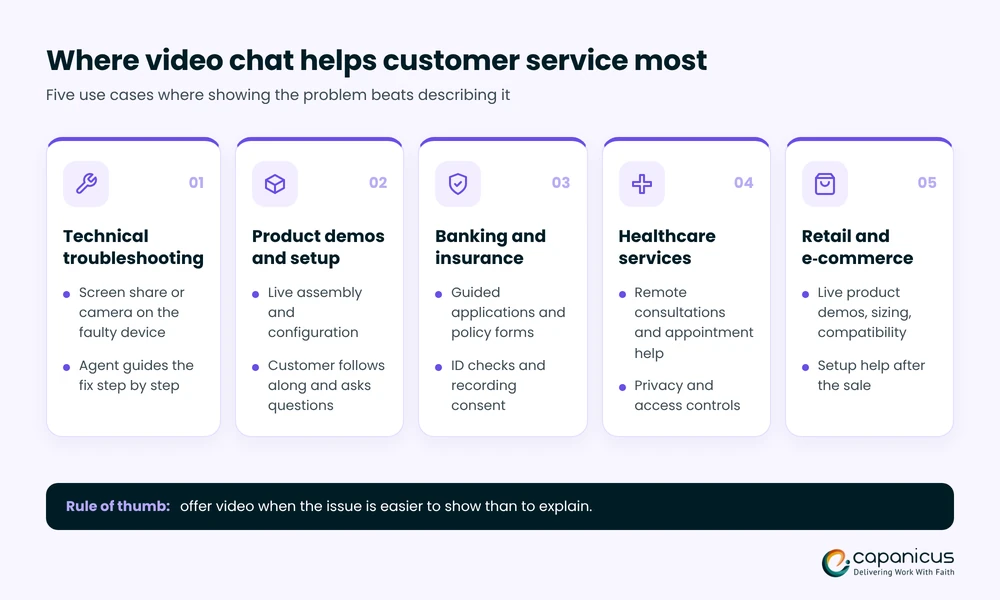
1. Technical Troubleshooting and Remote Assistance
Technical support services often receive complaints and challenges from consumers that are hard to resolve through written or audio communication alone. In this case, a consumer may not be able to identify the relevant component, describe the problem effectively, or even follow some complex directions.
Here, the agent can ask the customer to share their screen or point the camera at the faulty item, then guide them through each step.
This applies to software configuration, hardware troubleshooting, internet connection issues, and even equipment maintenance.
2. Product Demonstrations and Configuration Assistance
Companies that sell electronic products, home gadgets, industrial machinery, or other commodities can provide support services through video-chat demonstrations.
The agent can demonstrate how to assemble or configure the equipment, or how to use a specific function.
Customers can also follow along and ask questions easily.
3. Banking, Insurance, and Financial Services
Financial institutions can use video consultations for many activities, such as guiding customers through applications, answering account-related questions, and consulting on insurance issues.
For instance, the insurance agent can use video consultation to explain the policy details and help clients fill out forms.
Companies operating in regulated sectors may need to verify the client’s identity, protect their privacy, and get consent for recording the session.
4. Healthcare and Appointment-Based Services
Video communication can help healthcare providers offer video customer service remotely. Typical uses include remote consultations, appointment support, and conversations between care coordinators and patients.
During consultations, the system needs privacy and confidentiality controls, access control, and the other security measures required to protect healthcare data.
Video solutions should be customized according to the requirements of healthcare professionals and patients.
5. Retail and E-commerce Assistance
Sometimes, online buyers may need additional information to finalize their purchases. Images and product descriptions may not clarify every question a consumer has.
Over video, the support team can demonstrate the product, answer questions about compatibility and sizing, and compare products side by side. After the sale, a video call can help explain setup and troubleshoot problems.
How an Omnichannel Support Platform Connects Video With Other Channels
Adding video capabilities is just one part of building an overall customer service system. Organizations also need to handle conversations from different sources. An omnichannel support platform combines conversations from voice, live chat, WhatsApp, email, and SMS into one interface.
Agents then work from one platform rather than switching between multiple applications. For instance, a customer might start on website chat, follow up on WhatsApp, and move to a video call later. Without integration, the customer has to repeat the issue on every channel.
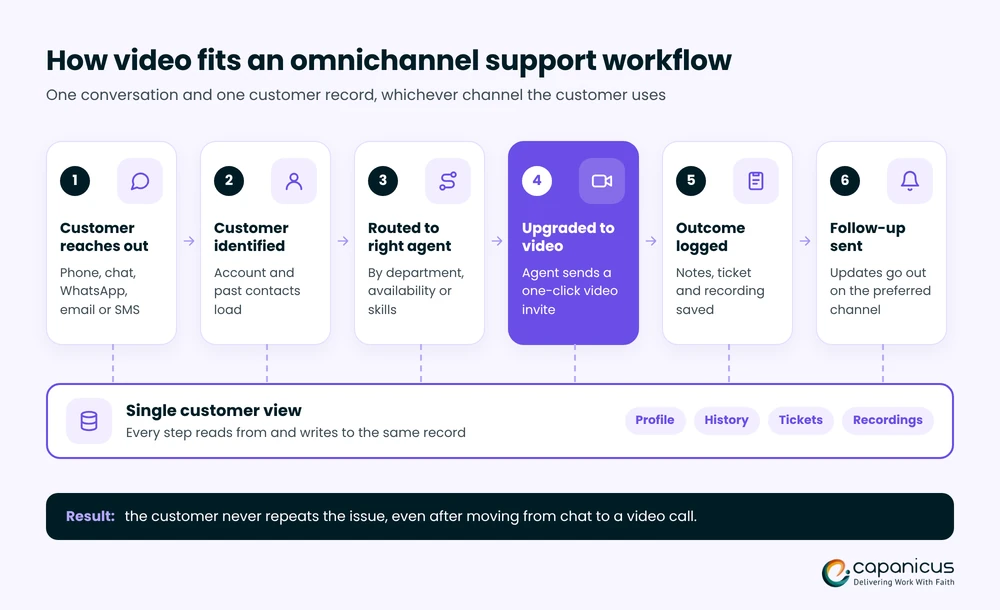
A standard workflow is as follows:
- Customer starts the contact: The customer reaches the company by phone, live video chat support on the website, WhatsApp, email, or text message.
- System identifies the customer: The system pulls up account information and all previous contacts with the customer.
- Conversation reaches the right agent: Routing rules send the conversation to the right agent based on department, availability, or skills.
- Visual support begins: If visual support is needed, the agent sends a video session invite or upgrades the chat to a video call.
- Outcome is logged: The system saves the result, notes, and ticket details against the customer record.
- Follow-up goes out: The customer gets updates through their preferred channel.
This integrated approach keeps the process smooth even when the customer switches channels.
Essential Features of a Video-Enabled Customer Support Platform
When adding video chat to customer service, companies need to plan for more than video quality. The features below create a manageable environment for video chat agents, and our guide to omnichannel platform features covers the wider list.
| Feature | What It Does | Why It Matters |
| Single customer view | Displays customer details and interaction history in one place | Prevents customers from repeating information |
| Video calling | Enables real-time video conversations between customers and agents | Supports visual troubleshooting and demonstrations |
| Unified inbox | Brings voice, chat, WhatsApp, email, and SMS into one workspace | Reduces application switching |
| Ticket management | Creates and tracks support requests | Keeps issues organized until resolution |
| SLA management | Tracks response and resolution commitments | Helps teams monitor service expectations |
| Automated routing | Assigns conversations using predefined rules | Connects customers with suitable agents |
| Workflow automation | Triggers notifications, follow-ups, and escalations | Reduces repetitive administrative work |
| Reporting and analytics | Measures channel performance and support activity | Helps managers identify operational gaps |
| CRM integration | Connects customer conversations with business records | Gives agents relevant customer information |
| Access controls | Manages permissions for agents and supervisors | Helps protect customer information |
Why a Single Customer View Matters
The single customer view becomes especially relevant when customers switch between communication channels.
The agent handling video call customer support must be able to see prior conversations, open tickets, purchases, and past support activity, within their access rights.
This helps the representative understand the customer’s case and ask additional questions. This also helps the supervisor get an overview of what has happened.
Ticketing, SLAs, and Automation
Video calls must be integrated into the standard support process. If an issue needs further investigation, the agent must be able to create or update a ticket.
The SLA tracker shows whether each customer request is handled within its agreed response time. Agents get notified about incomplete tasks, and overdue issues are escalated to managers.
Together, these keep video support manageable as volume grows.
Access Controls and Recording Consent
A video session can show a customer’s home, documents, or ID, so it needs tighter controls than text chat. Use role-based permissions to decide who can join, record, or replay a session.
If you record calls, tell customers at the start and save their consent with the ticket. Keep recordings only as long as your retention policy allows, especially in banking, insurance, and healthcare.
How to Set Up Video Chat for Customer Service
Incorporating video assistance goes beyond simply adding a call button on a website. Enterprises must consider the customer experience, technology infrastructure, and internal processes before deploying this service.
Step 1: Determine the Need for Video Assistance
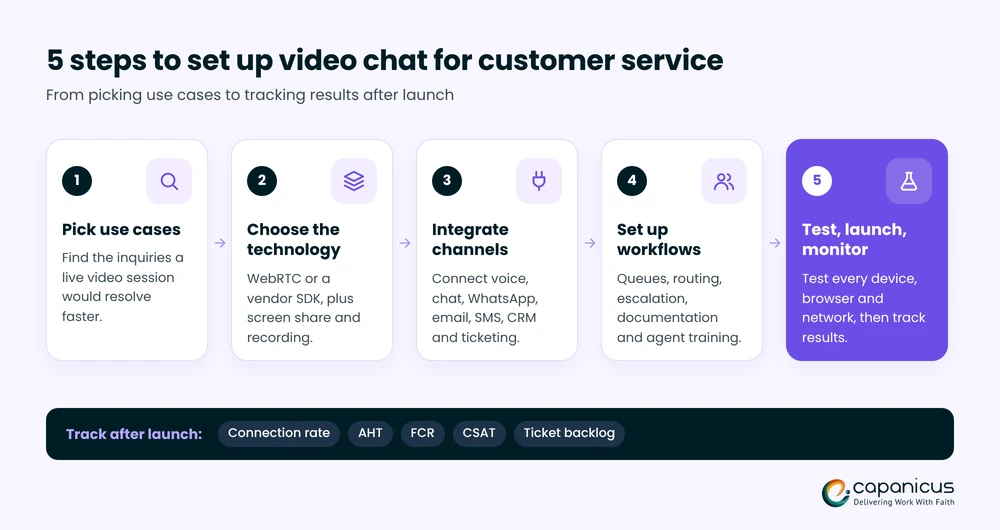
The first step is to review current customer inquiries and decide which ones a live video session would resolve faster. Examples include tech troubleshooting, product demonstrations, remote advice, and installation support calls.
Not every customer interaction should be conducted via video calls. It’s crucial to specify when an agent may offer this service.
Step 2: Choose the Appropriate Video Technology
Choose a technology that meets your customers’ expectations, device requirements, and the integrations you need.
WebRTC can be a good choice because it provides real-time communication in the browser. Customers can join a video call from a web page without installing a separate video-calling app.
Depending on product requirements, organizations may want features such as screen sharing, session management, recording, and mobile compatibility. If you are choosing between building on WebRTC and using a vendor SDK, our WebRTC vs Zoom SDK comparison covers the trade-offs.
Step 3: Integrate Video With Existing Support Channels
Video calls need to be integrated with your existing customer support systems.
Besides that, the feature can be connected to voice calls, chats on the website, WhatsApp, emails, and SMS wherever applicable. Make sure customers’ data and past conversation history are accessible when switching channels.
Also check CRM integration, help desk systems, and ticketing software during this step.
Step 4: Set Up Support Agent Workflows
Decide how support agents will receive video requests, and organize a workflow around them.
Set up agents’ work schedules, queue management, routing rules, escalation procedures, and ticket-generation methods. Specify how video calls will be documented and what to do if an agent is unable to help the customer.
Support staff must be trained in video etiquette, handling customers’ private information, and troubleshooting.
Step 5: Test, Launch, and Monitor Performance
Before offering video calls to customers, test them on all supported devices, browsers, and networks so that they work reliably.
Once the feature goes live, keep checking call quality, connection stability, access rights, notifications, and integrations.
After launch, monitor key metrics such as video call connection rate, average handle time (AHT), first contact resolution (FCR), customer satisfaction (CSAT), and open ticket backlog. This information will inform process improvements and help pinpoint any technological flaws.
Final Thoughts on Video Chat for Customer Service
Providing video chat for customer service helps businesses better understand and address customer problems. Video chat works well when visual support can simplify troubleshooting and show how things work.
Nevertheless, the success of video communications relies heavily on how well video chat fits into overall customer support activities. A customer database, ticketing system, SLA tracking, and reporting must be in place for seamless video customer support.
For companies that want to introduce a video support solution, start by analyzing the current communication setup, identify which processes would benefit from video, and then choose an existing or custom solution. For companies considering custom development, Capanicus builds WebRTC-based video support solutions. Capanicus also provides omnichannel platform development services that connect video calls with customer records, ticketing systems, and other customer support tools.
Talk to our team to plan video calls around the channels you already use.
Frequently Asked Questions
1. What is video chat for customer service?
Video chat for customer service enables customers and representatives to conduct video sessions with each other. It lets you troubleshoot technical problems, demonstrate products, provide remote assistance, and answer questions that require visual support.
2. Can video customer service work together with WhatsApp, emails, and live chat?
Yes, an integrated customer support system can combine video calling with WhatsApp, email, telephony, SMS, and website live chat. This gives agents access to the customer’s history and lets them reply through any support channel.
3. Is WebRTC a good choice for video customer support?
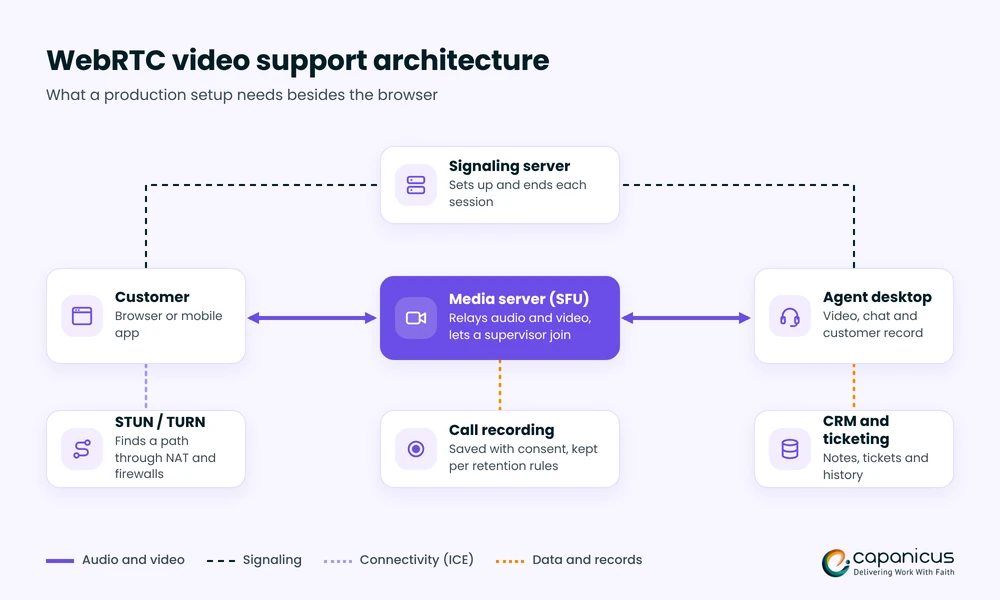
WebRTC fits browser-based real-time audio and video well. It can connect calls peer to peer, but a production system still needs a signaling server and STUN/TURN servers to get through NAT and firewalls. A media server is usually needed too, for recording, supervisor monitoring, or group calls.
4. Should a company build or buy a video call customer support platform?
Buying makes more sense when a business needs standard features. A custom solution is the better choice when a company needs complex integrations, its own branding, and more control over the platform architecture.