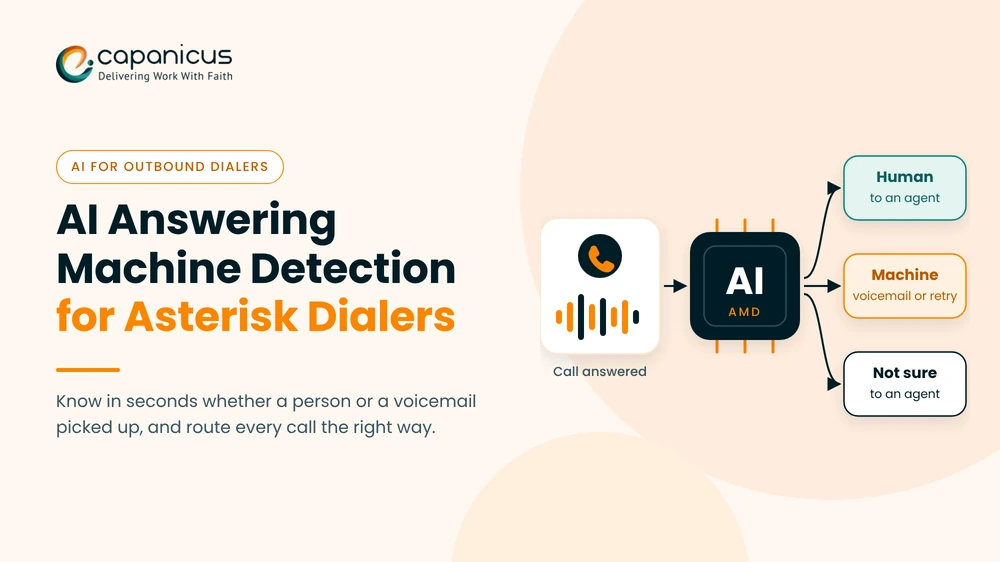
Every outbound team knows the cost of a wrong answering machine call. The dialer connects an agent to a voicemail greeting, or worse, hangs up on a real person who just said “Hello?”. On Asterisk, the built-in AMD() application has handled this job for years, but its timing rules struggle with today’s voicemail greetings, mobile networks and noisy lines. This guide explains how AI answering machine detection works and how it compares with Asterisk’s AMD(). It then shows how to add it to an Asterisk dialer, how to measure and tune accuracy, and which FCC abandoned-call rules your settings must respect.
It is written for teams that run or build Asterisk-based dialers: call centers, BPOs, VoIP providers and product teams. Each section ends with something you can act on, from a dialplan example to a test plan.
Quick Summary
What Answering Machine Detection Does in an Outbound Dialer
Answering machine detection (AMD) is the step that listens to the first seconds of an answered outbound call and decides who, or what, picked up. The verdict tells the dialer what to do next: connect an agent, leave a voicemail, retry later or hang up.
The Decision AMD Makes in the First Few Seconds
When a call is answered, the carrier sends an answer signal. That signal looks the same whether a person, a voicemail box, an IVR or a fax machine picked up. AMD has to tell them apart from the audio alone.
Most systems return one of three results: human, machine or not sure. Some also flag fax tones, carrier announcements, silence and IVR menus, so the dialer can handle each one differently.
Where AMD Fits in Predictive, Progressive and Power Dialing
A predictive dialer places more calls than there are free agents, based on expected answer rates. AMD matters most here, because the dialer wants only live people to reach agents. That is why predictive dialer AMD settings get the most attention in any outbound setup. If you are new to pacing, this explainer on how a predictive dialer works covers the basics.
In progressive and power modes, the dialer calls only when an agent is free, so AMD saves agent time rather than protecting pacing. In preview mode, the agent places the call and hears the answer directly, so AMD is usually switched off.
Because pacing, agent idle time and abandoned calls all depend on it, accurate detection is a core part of custom predictive dialer development.
Why Voicemail Is Harder to Spot Than It Used to Be
Old answering machines played long greetings and ended with a clear beep. Today, outbound calls reach mobile voicemail and carrier messages. They also reach call-screening assistants on modern phones and short personal greetings like “Hi, it’s Sam.”
Some of these greetings sound almost exactly like a live person. Network delay, comfort noise and compressed codecs also blur the silence gaps that simple voicemail detection depends on. That is the gap AI answering machine detection tries to close.
How Asterisk’s Built-In AMD() Application Decides
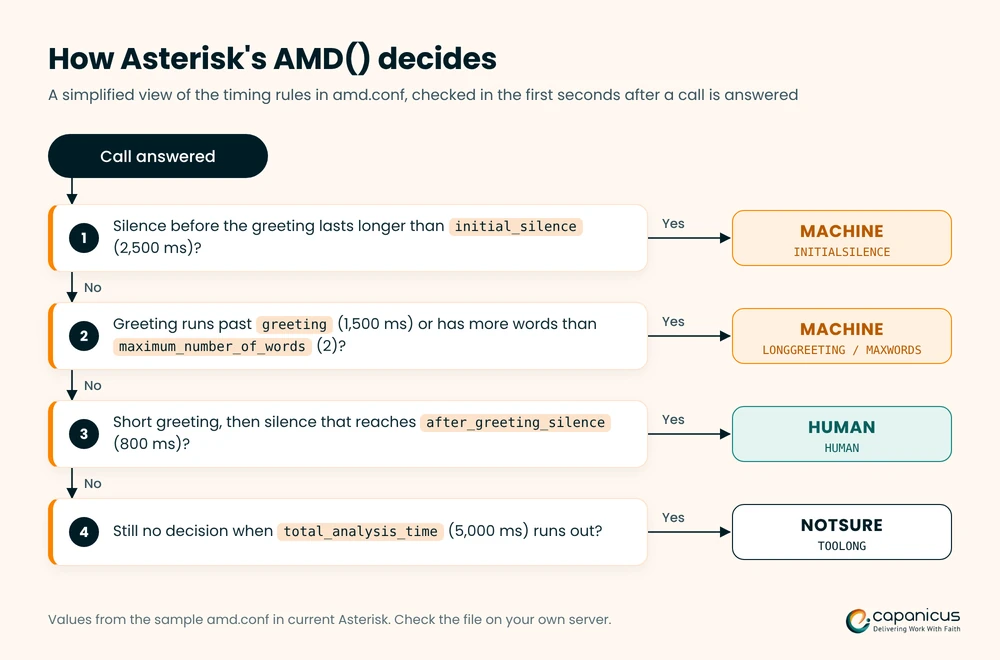
Asterisk ships with an AMD() dialplan application in the app_amd module, and it has been available since Asterisk 1.4. It is free and runs inside Asterisk. It does not understand words, though. It measures voice and silence, then applies timing rules.
If you are still choosing a platform for a new dialer, our FreeSWITCH vs Asterisk comparison covers the bigger trade-offs.
The amd.conf Settings That Control Detection
AMD() reads its defaults from amd.conf when the module loads, and any arguments you pass in the dialplan override them. All durations are in milliseconds. The sample amd.conf that ships with current Asterisk uses these values:
| Setting | Sample value | What it controls |
initial_silence | 2500 | Longest silence allowed before the greeting starts. Exceeded: MACHINE |
greeting | 1500 | Longest greeting allowed. Exceeded: MACHINE |
after_greeting_silence | 800 | Silence after a greeting that signals a person waiting for a reply. Exceeded: HUMAN |
total_analysis_time | 5000 | Maximum time AMD may take to decide |
min_word_length | 100 | Shortest burst of voice counted as a word |
between_words_silence | 50 | Silence needed before the next sound counts as a new word |
maximum_number_of_words | 2 | Most words allowed in a greeting. Exceeded: MACHINE |
maximum_word_length | 5000 | Longest burst of continuous voice accepted as one word. Exceeded: MACHINE |
silence_threshold | 256 | Average noise level (0 to 32767) below which audio counts as silence |
Older Asterisk releases shipped different sample values, so check the amd.conf on your own server before you tune anything.
Reading AMDSTATUS and AMDCAUSE
When AMD() finishes, it sets two channel variables. AMDSTATUS holds the verdict: MACHINE, HUMAN, NOTSURE or HANGUP. AMDCAUSE explains the verdict with a cause name followed by the measured values:
- INITIALSILENCE: nobody spoke before
initial_silenceran out, so the call is marked MACHINE. - LONGGREETING: the greeting ran longer than the
greetingsetting allows. - MAXWORDS: the greeting had more words than
maximum_number_of_words. - MAXWORDLENGTH: one burst of voice ran longer than
maximum_word_length. - HUMAN: a short greeting was followed by enough silence, so the call is marked HUMAN.
- TOOLONG: no decision was reached within
total_analysis_time, so the result is NOTSURE.
Log both variables on every call. AMDCAUSE is the fastest way to see which rule is behind a wrong result.
A Basic AMD Dialplan Example
Run AMD() only after the outbound call is answered. This example sends live answers and uncertain results to an agent queue, and plays a short message to answering machines:
[dialer-amd]
exten => s,1,NoOp(Outbound call answered)
 same => n,AMD()
 same => n,NoOp(AMD result: ${AMDSTATUS} / ${AMDCAUSE})
 same => n,GotoIf($["${AMDSTATUS}" = "MACHINE"]?machine,1)
 same => n,Queue(sales-agents)   ; HUMAN and NOTSURE go to agents
 same => n,Hangup()

exten => machine,1,WaitForSilence(1500,1,20)
 same => n,Playback(custom/voicemail-message)
 same => n,Hangup()
WaitForSilence() waits for the greeting to go quiet before the message plays. It is a simple stand-in for beep detection, so test it against real greetings from your own call lists. Leaving prerecorded messages also has consent rules, covered in the compliance section below.
Where Rule-Based Detection Breaks Down
Timing rules work well on classic greetings and poorly on everything else. These are the patterns that cause most wrong results:
- A person who answers and waits silently can run past
initial_silenceand be marked MACHINE. - A person who answers with a full sentence, such as “Hello, this is Priya from accounts,” can exceed
maximum_number_of_wordsand be marked MACHINE. - A short voicemail greeting such as “Hi, it’s Sam,” followed by a pause, can look like a person and reach an agent.
- Background noise and comfort noise can hide silence, which confuses every timing rule.
Tuning one rule to fix one error often creates another. Raising maximum_number_of_words means fewer live people get marked MACHINE by mistake, but more voicemail reaches agents. This is one of the Asterisk development challenges that dialer teams meet as volume grows, and it is why many move to AI answering machine detection.
How AI Answering Machine Detection Works
AI answering machine detection replaces fixed timing rules with a model trained on real call audio. Instead of counting words and pauses, the model learns what live answers, voicemail greetings, IVRs and carrier messages sound like. Most systems use one of the three approaches below, or a mix of them.
Acoustic Models That Classify the Audio Directly
An acoustic model turns the first second or two of audio into features, such as a spectrogram, and classifies them. It can pick up cues that timing rules miss. Examples include the flat, compressed sound of a recorded greeting, the background sound of a live phone and the steady rhythm of a scripted message.
Because it works on sound rather than words, an acoustic model can decide quickly. It can also work across languages, as long as its training data covers the languages, accents and carriers you call.
Speech-to-Text Models That Read the Greeting
A second approach transcribes the greeting with streaming speech-to-text and checks the words. Phrases like “you’ve reached”, “not available” or “leave a message after the tone” are strong machine signals. A short “Hello?” followed by silence is a strong human signal.
This approach is easy to explain and audit, because you can read why a call was marked MACHINE. It does add transcription delay, though, and it needs speech-to-text support for every language you dial.
Beep and Tone Detection for Voicemail Drop
If your campaign leaves voicemail, spotting the machine is only half the job. The message has to start after the beep, or the first part of it is lost.
AI systems often add a separate step that listens for the end of the greeting and the beep. The same step can catch fax and modem tones and the special information tones that networks play for disconnected or unreachable numbers.
Rule-Based AMD vs AI AMD at a Glance
| Factor | Asterisk AMD() | AI answering machine detection |
| How it decides | Silence and word-timing rules | A model trained on labeled call audio |
| Setup | Built in, configured in amd.conf | A separate service connected to Asterisk |
| Cost | Free | Hosting and compute, or per-call API fees |
| Short or formal greetings | Often misclassified | Handled better when trained on similar calls |
| Languages and accents | Not language-aware | Depends on the training data |
| Tuning | Manual threshold changes | Confidence thresholds and retraining |
| Explaining a result | AMDCAUSE shows the rule that fired | Needs confidence scores and logs |
| Best fit | Low volume, simple campaigns | High volume, mobile-heavy or multi-country campaigns |
Many teams keep AMD() as a fallback. If the AI service is slow or unreachable, the call still gets a verdict.
How to Add AI AMD to an Asterisk Dialer, Step by Step
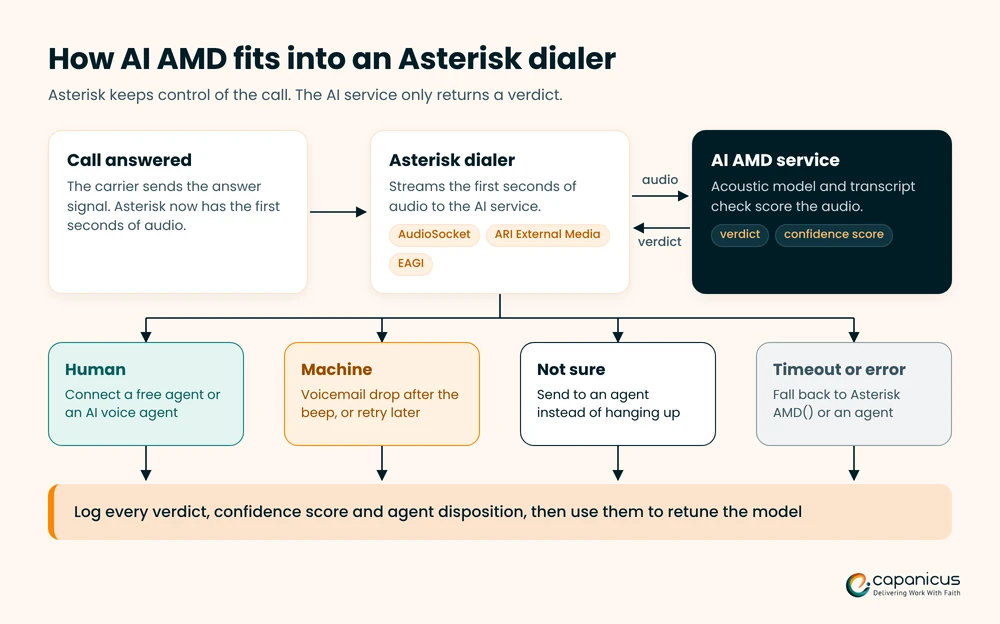
You do not need to replace Asterisk to use AI answering machine detection. The usual pattern keeps Asterisk in charge of the call and sends the first seconds of audio to a separate detection service. The diagram shows the flow, and the four steps below explain each part.
Step 1: Stream the First Seconds of Call Audio Out of Asterisk
Asterisk offers three common ways to get live call audio to an outside service:
- AudioSocket: a simple two-way audio protocol over TCP, added to Asterisk in 2020 as a dialplan application and a channel driver.
- ARI External Media: an ARI request that creates a channel streaming the call’s audio to an external host over RTP or AudioSocket. Pair it with a snoop channel to listen without changing the call.
- EAGI: an AGI script that receives the caller’s audio on an extra file descriptor. It is simple to start with, but it runs one process per call.
Stream only what the model needs, usually signed linear audio at 8 or 16 kHz, from the moment of answer until a verdict comes back. This is the same audio path teams use to connect AI voice agents to a PBX, so one integration can serve both jobs.
Step 2: Classify the Audio in Real Time
The detection service reads short audio frames and updates its prediction as each one arrives. It should return a verdict as soon as confidence passes your threshold, and never later than a hard time limit you set.
Typical outputs are human, machine, not sure, fax and silence, each with a confidence score. Keep the service close to Asterisk on the network, because every round trip adds dead air for the person on the line.
Step 3: Return the Verdict and Route the Call
The service sends its result back to Asterisk, for example by setting a channel variable over ARI or by returning it to an AGI script. The dialplan then routes the call the same way it routes AMDSTATUS:
- Human: bridge the call to the next free agent, or hand it to a custom AI voice agent for qualification.
- Machine: hang up and schedule a retry, or wait for the beep and play a voicemail message.
- Not sure: send the call to an agent, because a few seconds of agent time cost less than hanging up on a customer.
- Timeout or error: fall back to AMD(), or route the call to an agent.
Step 4: Log Every Verdict and Compare It With Outcomes
Store the verdict, confidence score, decision time and, if AMD() also ran, AMDCAUSE for every call. Then compare those fields with what actually happened: agent dispositions, call length and, where recording is allowed, a sample of recordings.
Agent dispositions are your cheapest error report. When an agent marks a call as “answering machine” after AMD said human, you have found a missed machine. Sending these fields to your CRM through contact center CRM integration lets supervisors see detection quality next to campaign results.
Measuring Accuracy, Speed and Routing Decisions
An AMD setup is only as good as its most expensive mistake. Before you tune anything, agree on what each type of error costs your business.
False Positives vs False Negatives
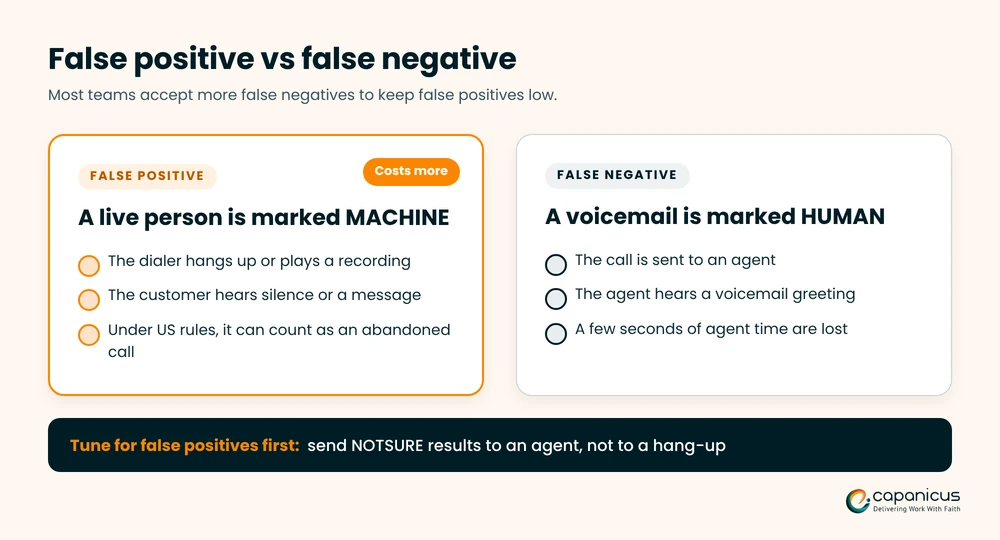
A false positive marks a live person as a machine. The dialer hangs up on, or plays a recording to, someone who answered. That annoys the customer, and under US rules it can count as an abandoned call.
A false negative marks a machine as human. An agent hears a voicemail greeting and loses a few seconds. Whether you run AMD() or AI answering machine detection, most teams accept more false negatives to keep false positives low.
The Trade-Off Between Detection Time and Dead Air
Every extra moment of analysis is silence for the person who answered. Many people say “Hello?” once or twice, hear nothing and hang up.
A detector that waits longer is usually more accurate, but it loses more live calls. It also uses up more of the two-second window that US rules allow after a greeting. Track the median and the slowest decision times, not only accuracy. Network latency in your call center adds to this delay, so check the media path too.
Deciding What Happens to NOTSURE Results
Every detector returns some uncertain results, so decide the rule per campaign. For sales and service calls, sending NOTSURE to an agent is the safer default. For high-volume reminder campaigns, retrying later can make more sense.
Watch how often NOTSURE appears. A rising share usually means a carrier, codec or greeting pattern has changed.
How to Test and Tune AMD Before Going Live
A careful rollout prevents most AMD surprises. Before you move a campaign to AI answering machine detection, use this order:
- Build a labeled test set from your own calls: live answers, mobile voicemail, business voicemail, IVRs, carrier messages and silence, for every country and language you call.
- Run the new detector in shadow mode. It listens and logs, but your current AMD setup still routes the calls.
- Compare false positives, false negatives, NOTSURE share and decision time between the two systems.
- Switch one campaign at a time, starting with the campaign where false positives cost the most.
- Re-test after any change to carriers, codecs, models or campaign scripts.
Compliance Rules That Shape Your AMD Settings
AMD settings are not only a performance choice. In the US, they decide whether a campaign stays inside federal telemarketing rules. This section is a summary, not legal advice, so confirm the rules for your campaigns with your legal team.
The FCC’s 3% Abandoned Call Limit
Under the FCC rule, a telemarketer may not abandon more than three percent of telemarketing calls answered live by a person. The rate is measured over a 30-day period for a single calling campaign. Calls answered by a machine are not live answers, so they do not count toward that limit.
This is where AMD accuracy becomes a compliance issue. Every live person who is hung up on or left in silence by mistake can push the abandoned rate up.
The Two-Second Rule After the Greeting
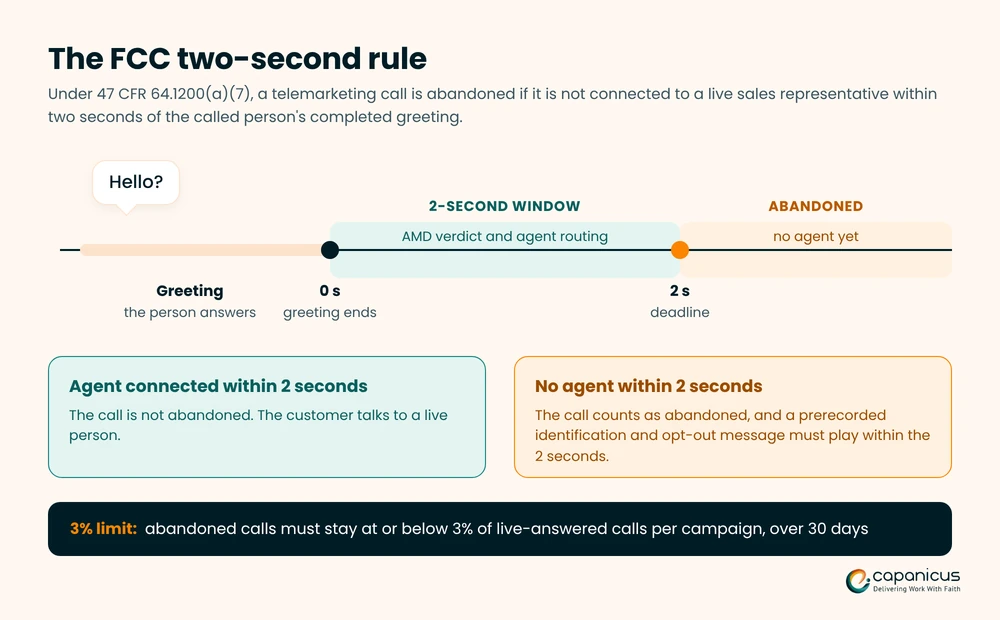
A call counts as abandoned if it is not connected to a live sales representative within two seconds of the called person’s completed greeting. If no agent is free, the dialer must play a prerecorded identification and opt-out message within those two seconds.
Your detection time, your after_greeting_silence setting and your agent routing all have to fit inside this window. That is why slow detection is a compliance risk, not just an annoyance.
Ring Time, Voicemail Messages and Consent
The same FCC rule also says an unanswered telemarketing call must ring for at least 15 seconds or four rings before the dialer disconnects it. Set your no-answer timeout with this in mind.
Leaving prerecorded marketing messages on voicemail raises separate consent questions under the TCPA, so check them before you turn on voicemail drop. The FTC’s Telemarketing Sales Rule sets matching abandoned-call limits for the calls it covers.
Rules Outside the US
Other markets have their own rules. In the UK, Ofcom treats abandoned and silent calls as persistent misuse. It also expects call centres that use AMD to include a reasoned estimate of AMD false positives in their abandoned call rate. In India, TRAI regulates commercial calls under its customer preference regulations.
If you dial across borders, set your AMD and routing rules per country, not once for the whole platform.
Common AMD Problems on Asterisk and How to Fix Them
Most AMD complaints fall into a few patterns. Start with the symptom, check AMDCAUSE or the AI confidence score, then apply the fix.
Live Callers Are Being Hung Up On
This is usually an initial_silence or maximum_number_of_words problem. People who pause before speaking, or answer with a full sentence, get marked MACHINE.
Pull the AMDCAUSE values for the complaint calls first. Then raise the setting behind them in small steps, send NOTSURE to agents, and consider AI answering machine detection for the campaigns where this keeps happening.
Agents Keep Hearing Voicemail Greetings
Short personal greetings are the usual cause. A greeting like “Hi, it’s Sam” followed by a pause passes the after_greeting_silence test and looks human.
Ask agents to tag these calls with an “answering machine” disposition, so you can measure the problem. A model trained on short greetings, or a transcript check for phrases like “leave a message”, catches many of them.
Long Silence After the Person Says Hello
Dead air comes from three places: long analysis time, a slow round trip to the detection service, or no free agent when the verdict arrives.
Let the detector return early once it is confident, host it close to Asterisk, and check that dialer pacing matches real agent availability. Each fix shortens the gap the caller hears.
Results Change by Carrier, Codec or Country
Carriers differ in early media, comfort noise and codecs, and voicemail platforms differ by country. A detector tuned on one route can drift on another.
Report detection results by carrier route and by country, not only overall. Test every new carrier in your SIP trunking setup before it carries campaign traffic.
When It Makes Sense to Build a Custom AI AMD Dialer
Not every team needs AI answering machine detection on day one. A small campaign with classic greetings can run well on a tuned AMD(). The signs below suggest your setup has outgrown it.
Signs Your Current Detection Setup Has Hit Its Limit
- Customers complain about calls that hang up after they say hello.
- Your abandoned rate sits close to the 3% limit even with careful pacing.
- Agents spend a noticeable part of each hour on voicemail greetings.
- NOTSURE results keep growing, or results change when you add a carrier.
- You are expanding to new countries, languages or mostly mobile lists.
Build, Buy or Plug In a Third-Party AMD API
There are three common ways to get AI AMD, and each suits a different team:
- Plug in an AMD API: the fastest start. You pay per call, call audio leaves your network, and you depend on the vendor’s model.
- Buy a dialer with AI AMD built in: quick to launch, but you work within that product’s features, data model and pricing.
- Build it into your own Asterisk dialer: the most control over models, data, routing and cost at scale. It needs engineering effort and ongoing tuning.
If you are weighing a full build, our guide on how to build a predictive dialer covers the architecture and features in more detail.
How Capanicus Adds AI AMD to Asterisk Dialers
Capanicus builds custom predictive dialers and telecom platforms on Asterisk and FreeSWITCH. We can add AI answering machine detection to an existing Asterisk dialer or build it into a new one.
That covers the audio streaming layer, the detection service, fallback to AMD(), routing rules per campaign, and reporting on false positives, NOTSURE share and decision time. Our Asterisk development services team works with your current dialplan, carriers and CRM, so you keep what already works.
Final Thoughts on AI AMD for Asterisk Dialers
Answering machine detection decides whether your agents spend the day talking to people or to voicemail. Asterisk’s AMD() is a solid free starting point, but its timing rules struggle with short greetings, formal greetings, mobile voicemail and noisy lines.
AI answering machine detection reads the audio itself, which helps exactly where timing rules fail. It works best when you test it on your own calls, measure false positives first and keep decision time short. Start in shadow mode, compare the results with AMD(), and roll it out one campaign at a time.
Planning AI AMD for your dialer? Talk to our dialer engineers about your Asterisk setup.
Frequently Asked Questions About AI Answering Machine Detection
Does Asterisk have built-in answering machine detection?
Yes. The AMD() dialplan application analyzes silence and word timing after a call is answered. It then sets AMDSTATUS to HUMAN, MACHINE, NOTSURE or HANGUP.
Is AI AMD more accurate than Asterisk AMD()?
It often is on short, formal or unusual greetings, but results depend on the training data. Test both on your own recorded calls before you switch.
How fast should answering machine detection decide?
As fast as it can stay accurate. US rules count a call as abandoned if a live person is not connected within two seconds of their completed greeting.
Can I add AI AMD to my existing Asterisk dialer?
Usually, yes. The detection service connects at the Asterisk layer through AudioSocket, ARI External Media or EAGI, so the dialer and agent screens can stay the same.