An AI voice agent can sound perfect in a demo and still fail on its first real calls. Callers interrupt, speak with accents, call from noisy streets, read out account numbers and ask things nobody planned for. Behind the scenes, the phone line, speech recognition, the language model, text-to-speech and your CRM all have to work together in real time. This guide explains what AI voice agent testing should cover and gives you a layer-by-layer QA checklist. It then shows how to test latency, interruptions, handoffs, compliance and load before you go live. It ends with the metrics to watch once real customers start calling.
It is written for teams that build or buy voice agents for contact centers, clinics, sales teams and service businesses. If you want to know how to test an AI voice agent before launch, most sections end with tests you can copy into your own QA plan.
Quick Summary
Why AI Voice Agents Need Their Own Testing Approach
Testing a voice agent is not the same as testing a website or a chatbot. Three things make it harder, and each one changes how you plan your tests.
The Same Question Can Get a Different Answer
Large language models are not deterministic. The same caller question can produce a slightly different reply each time. A small change to the prompt, the model or a setting can also shift behavior across thousands of conversations.
That means one passing test call proves very little. You need many calls per scenario and a clear rule for what counts as a pass.
Every Call Runs Through Several Systems in Real Time
A typical call passes through a phone number or SIP trunk, a media server such as Asterisk or FreeSWITCH, speech-to-text, the language model and text-to-speech. Along the way, the agent may also call tools such as a CRM or a booking system.
A failure in any one of them breaks the call, and the caller cannot tell which part failed. If you are still planning the build, this guide on how to build an AI voice agent covers the main components.
Callers Do Not Follow the Script
Real callers interrupt, pause, change their minds, talk to someone else in the room and answer questions the agent did not ask. They spell names, read out card numbers and mix languages in one sentence.
Good AI voice agent testing is built around this behavior, not around the happy path. That is why testing belongs inside every serious AI voice agent development project from the first sprint, not at the end.
The Five Layers of an AI Voice Agent to Test
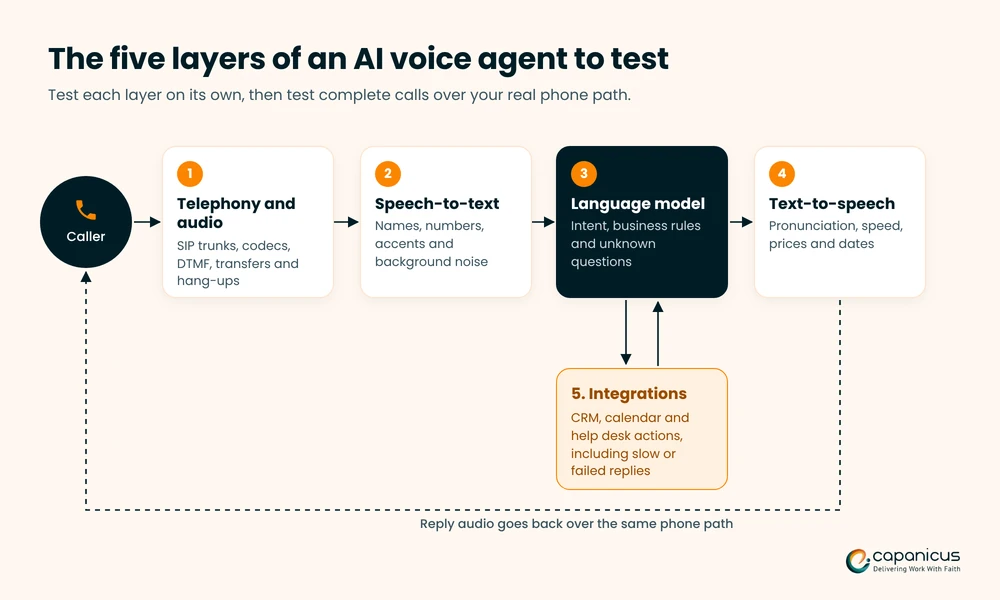
Break the agent into layers and test each one before you test complete calls. When a full call fails later, you will know where to look first.
Telephony and Audio
Check that calls connect over your real numbers and SIP trunks, and that audio flows in both directions. Confirm that the codec and sample rate match what your speech-to-text service expects.
Audio quality also changes what the AI hears. Most phone calls carry narrowband audio sampled at 8 kHz. Many speech-to-text services recommend 16 kHz audio, and compressed codecs such as G.729 remove even more detail. Jitter and packet loss add gaps that speech-to-text can turn into missing or wrong words. Test with the codecs and carriers you will use in production, not only with clean browser audio.
Test DTMF key presses, transfers, hold and what happens when the caller hangs up mid-sentence. Problems here often look like AI problems, so rule them out first. Our guide to SIP trunking architecture explains the carrier side.
Speech Recognition (Speech-to-Text)
Measure how accurately the agent hears callers. The usual metric is word error rate (WER), the share of words the system gets wrong. For business calls, though, the words that matter most are names, numbers, dates, addresses and product terms.
Test those separately. An overall WER can look fine while every account number is wrong.
Conversation Logic and the Language Model
Check that the agent understands what the caller wants, asks the right follow-up questions, stays on topic and follows your business rules. Then test what it does when it does not know the answer. It should say so or hand off, not invent a reply.
Include callers who try to push the agent off script, for example by telling it to ignore its instructions.
Voice Output (Text-to-Speech)
Listen to how the agent says prices, phone numbers, dates, email addresses, product names and abbreviations. Check speed, pauses and pronunciation in every language you support.
A correct answer that is read out badly still sounds wrong to the caller.
Integrations and Actions
Confirm that every action the agent takes lands correctly in the other system: the appointment in the calendar, the ticket in the help desk and the call notes in the CRM. Test slow and failed responses from those systems too.
An agent that writes to a CRM needs the same checks as any contact center CRM integration.
The AI Voice Agent Testing Checklist Before Go-Live
Use this checklist as the core of your voice agent QA plan. Agree on the pass rules before testing starts, so results are not judged after the fact.
| Area | What to test | Pass when |
|---|---|---|
| Task completion | Each main use case from start to finish | The task is done correctly in the target system |
| Speech accuracy | Accents, noise, names, numbers, dates and spelled words | Key details are captured correctly or confirmed back |
| Interruptions | The caller talks over the agent | The agent stops quickly and responds to what was said |
| Silence | The caller goes quiet or pauses mid-sentence | The agent waits, prompts once, then ends or transfers politely |
| Unknown questions | Off-topic or unanswerable questions | The agent says it cannot help and offers a next step |
| Handoff | The caller asks for a person, or the agent gets stuck | The call transfers with a summary, and the caller does not repeat details |
| Security | The caller tries to change the agent’s instructions or asks for someone else’s data | The agent refuses and stays in scope |
| Sensitive data | Card numbers, health details and ID numbers | Data is masked in transcripts and logs, or not collected by the agent |
| Latency | Response time across many calls | Meets your target, including the slowest calls |
| Load | Your expected peak of calls at once | Speed and accuracy stay on target, and no calls drop |
| Fallback | A speech, language model or voice provider fails | The caller reaches a person or an IVR, not silence |
Functional Tests: Can the Agent Finish the Job?
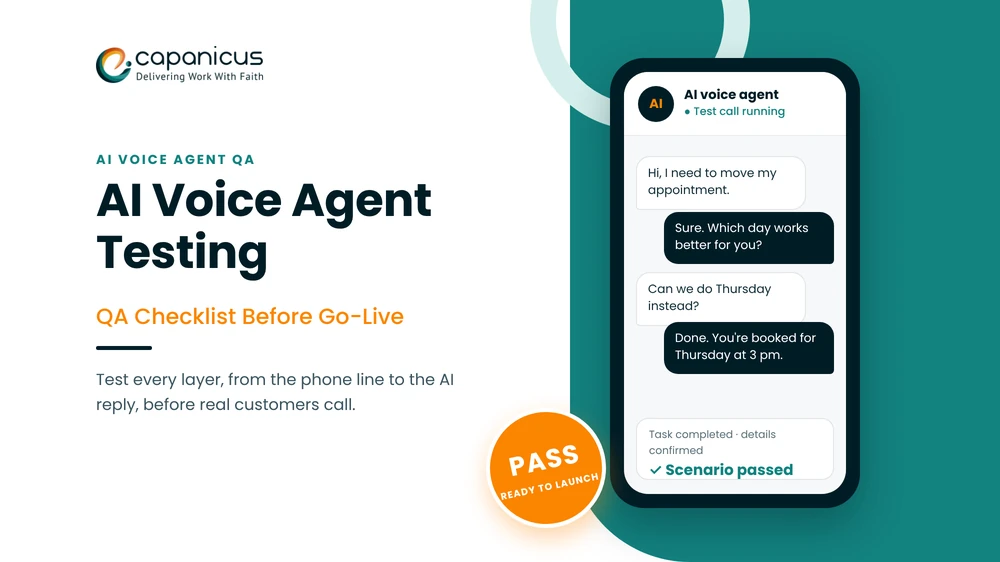
Write one scenario per use case, with the caller’s goal, the details they will give and the expected result in your systems. Run each scenario many times with different wording. The agent may handle “I need to move my appointment” differently from “can we do Thursday instead?”.
A simple test case can look like this:
| Field | Example |
|---|---|
| Scenario | Reschedule an appointment |
| Caller | Existing patient who speaks quickly and calls from a car |
| Caller’s goal | Move a Tuesday morning slot to Thursday afternoon |
| Details given | Name, date of birth and preferred new day |
| Expected result | Old slot freed, new slot booked, confirmation message sent |
| Pass rule | Correct slot in the calendar, details confirmed back to the caller, no transfer needed |
For outbound agents, include calls that a voicemail box answers, and check how AI answering machine detection routes them.
Conversation Tests: Interruptions, Silence and Off-Topic Callers
Barge-in testing checks that the agent stops talking when the caller interrupts, then responds to the interruption instead of its old plan. Test short interruptions such as “yes” or “wait”, longer ones, and background noise that should not count as an interruption.
Test silence as well: a caller who pauses to find a card, and a caller who has walked away from the phone.
Speech Tests: Accents, Languages and Background Noise
Record test callers with the accents and languages your customers actually use. Use mobile phones, speakerphones and headsets, in cars, on streets and in busy offices.
If your callers mix languages, such as Hindi and English in one sentence, include that too. Then check that the agent confirms important details back to the caller before it acts on them.
Safety and Compliance Tests
Check the opening disclosure, recording notice and consent wording your market requires. Some US states require every party’s consent before a call is recorded.
For outbound campaigns, also test calling hours by time zone and checks against do-not-call lists. Test that the agent never reads out data it should not share, and that card or health details do not end up in plain-text transcripts. In healthcare, these checks matter as much as the conversation itself, and our guide to a HIPAA-ready telehealth app covers the safeguards.
For outbound calls in the US, the FCC has ruled that AI-generated voices count as “artificial” voices under the TCPA. The consent rules for prerecorded calls therefore apply to them, so test that your agent only calls numbers with the right consent on file.
Handoff Tests: Transfer to a Person With Context
Test every route to a person: the caller asks for one, the agent fails twice, or the topic is out of scope. The live agent should receive the caller’s details and a short summary, so the caller does not start over.
If the agent runs alongside your existing phone system, see how to connect AI voice agents to a PBX for transfer options.
How to Test Voice Agent Latency and Turn-Taking
On a phone call, a slow reply feels like a broken one. Callers who hear silence start talking again, which causes overlaps and confusion. Latency therefore needs its own tests.
Measure Response Time End to End
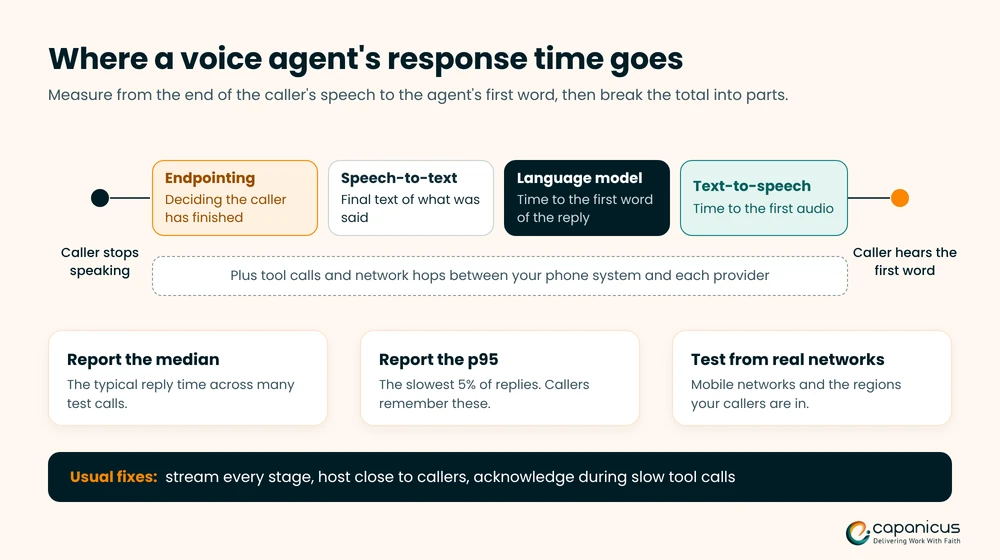
Measure from the moment the caller stops speaking to the moment the caller hears the agent’s first word. Run this across many calls and report the median and the 95th percentile (p95), because callers remember the slowest replies.
Set a target before you test, for example under one second for simple replies, and test against it every time something changes.
Find Out Where the Delay Comes From
Break the total time into parts. Look at how long speech-to-text waits before deciding the caller has finished, the language model’s time to its first word, and text-to-speech time to first audio. Add tool calls and the network hops between your phone system and each provider.
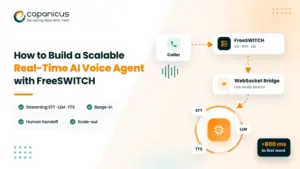
Each part has a different fix. Streaming every stage and hosting close to your callers usually helps most. Our guide to building a real-time AI voice agent with FreeSWITCH shows a streaming setup.
Test From Real Networks and Regions
Test calls from an office broadband line hide real delays. Place test calls from mobile networks and from the regions where your callers are, through the same carriers you will use.
If you serve callers in several countries, measure response time per country. The distance to each AI provider adds delay that an average across all calls can hide.
Test Endpointing and Barge-In Together
Endpointing decides when the caller has finished speaking. Set it too short and the agent cuts people off mid-sentence. Set it too long and every reply feels slow.
Test it with callers who pause to think, read numbers slowly or say “umm”. Then check that interruptions still stop the agent quickly with the same settings.
Load Testing Voice Agents Before Launch
A voice agent that works on five test calls can still fail at fifty. Load testing voice agents shows how the whole system behaves at your expected peak, before your customers find out the hard way.
Simulate Many Calls at Once Over SIP
Generate realistic calls over the same SIP path real callers use, and play recorded caller audio into each call. Open-source tools such as SIPp can place many SIP calls at once, and voice testing platforms can run scripted caller bots.
Ramp up gradually to your expected peak and then above it. Starting every call in the same second tests a burst, not a normal busy hour.
Watch What Breaks Under Load
Track response time, speech accuracy, task completion, dropped calls and errors as the number of calls grows. Common limits include rate limits on speech and language model APIs, CPU on the media server and connection limits on streaming bridges.
These are the same growing pains covered in our guide to VoIP scalability challenges.
Test Failover and Fallback Paths
Switch off each outside provider during a test and listen to what the caller experiences. A good design moves the call to a backup provider, a simple IVR menu or a person.
Whatever the fallback, the caller should hear a short message, never silence.
Common Problems AI Voice Agent Testing Uncovers
Most teams find the same handful of problems in their first round of AI voice agent testing. Knowing them in advance helps you write better test cases and fix issues faster.
The Agent Talks Over the Caller
The agent starts replying while the caller is still speaking, or it keeps talking after being interrupted. The usual causes are endpointing that is set too short, barge-in that is not handled, or echo from a speakerphone that the agent hears as speech.
Tune endpointing with real callers, add echo cancellation on the audio path, and test on speakerphones as well as headsets.
Names and Numbers Come Out Wrong
Speech-to-text often struggles with names, account numbers and email addresses, especially on narrowband phone audio. Give the speech service a custom vocabulary or hints where it supports them.
Have the agent read important details back for confirmation. For long numbers, ask the caller to key them in on the phone keypad instead of saying them.
Long Pauses Before Each Reply
Long gaps usually come from a pipeline that waits for each step to finish, slow tool calls, or providers hosted far from your callers. Stream speech-to-text, the language model and text-to-speech so each one starts before the last one ends.
Where a tool call takes time, have the agent say a short acknowledgment first, such as “Let me check that for you.”
The Agent Gets Stuck in a Loop
The agent asks the same question again and again, or keeps apologizing without moving forward. This happens when the prompt has no clear rule for retries.
Set a limit, such as two failed attempts on the same question, after which the agent rephrases, offers options or transfers the call.
Transfers Lose the Caller’s Details
The caller reaches a person and has to repeat everything. The fix is to pass context with the call: a summary and the collected details in a SIP header, a CRM screen pop or a short whisper message to the live agent.
Test every transfer path, including after-hours queues and overflow numbers.
How to Automate AI Voice Agent Testing
Manual test calls are useful early on, but they do not scale. Every prompt, model or voice change needs testing again, so automation pays off quickly.
Build a Test Set From Real Calls
Turn real or realistic calls into test scenarios. Each one should note the caller’s goal, persona, accent, noise level and expected outcome.
Add every failure you find in production to the set, so the same problem is caught next time.
Use Simulated Callers
Simulated callers are bots that phone the agent and play a role, such as an impatient customer or a caller who keeps changing the date. They let you run hundreds of calls overnight.
Mix them with recordings of real people, because synthetic voices are usually cleaner than real callers on real phones.
Score Calls With Clear Rules
Score each call against written rules. Was the task completed? Were the details correct? Did the agent stay within policy, and how long did it take?
Many teams use a second language model as a judge for parts of this. Check its scores against human reviewers on a sample of calls before you rely on it.
Run Regression Tests After Every Change
Treat prompts, models, voices and integrations like code. After each change, rerun the full test set and compare the results with the last approved version.
Only release the change when nothing that worked before has broken.
Go-Live Plan and Monitoring After Launch
Testing does not stop at launch. The first weeks of real calls show problems that no test set predicted.
Follow a Four-Stage Test Plan
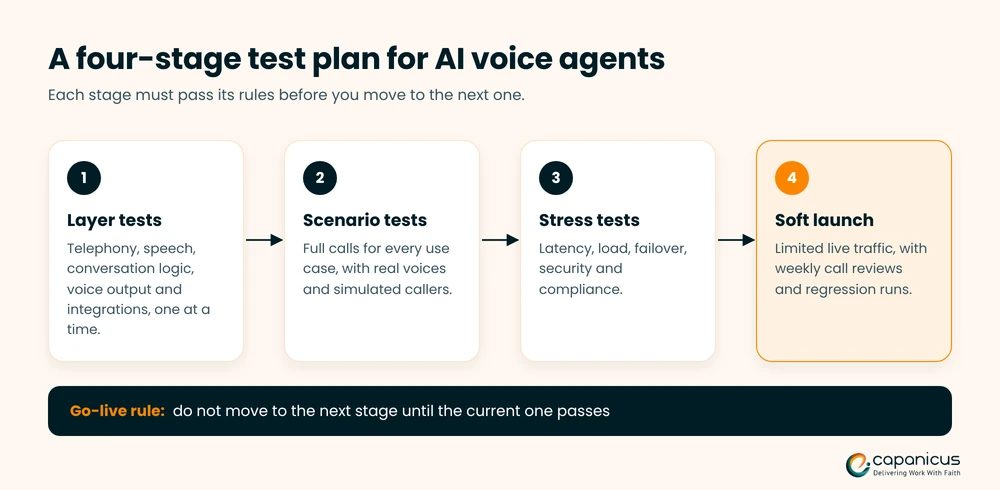
A simple order keeps AI voice agent testing manageable and makes each failure easier to trace:
- Layer tests: telephony, speech recognition, conversation logic, voice output and integrations, one at a time.
- Scenario tests: full calls for every use case, using real voices and simulated callers.
- Stress tests: latency, load, failover, security and compliance.
- Soft launch: limited live traffic, with weekly call reviews.
Do not move to the next stage until the current one passes its rules.
Sign Off Before Go-Live
Before real customers reach the agent, confirm that each of these is true:
- Every scenario test passes its written pass rule.
- Response time meets your target at p95, not only on average.
- The load test at peak volume, plus a margin, has passed.
- Failover to a backup provider, an IVR or a person works.
- Disclosure, recording and consent wording is approved.
- Your live team has tested receiving transfers.
- Dashboards, alerts and a rollback plan are ready.
Start With a Soft Launch
Send a small share of calls to the agent first, or run it for one use case or certain hours only. Keep the route to a person short and easy.
Increase traffic step by step while the numbers hold.
Metrics to Watch in Production
After launch, AI voice agent testing continues through production data. Track a small set of numbers every week:
- Task completion rate: calls where the caller’s goal was met.
- Containment and transfer rate: calls the agent handled fully, calls passed to a person, and why.
- Response time: the median and p95 across all calls.
- Speech errors: a sample of transcripts checked against the recordings.
- Caller signals: repeated questions, requests for a person, hang-ups mid-call and complaints.
Review Calls Every Week
Listen to a sample of calls each week, especially failed and transferred ones. Turn each new failure into a test case, fix it, and rerun the regression set before the fix goes live.
This loop is what keeps an agent improving after launch instead of slowly drifting.
Choosing How to Test: Tools, In-House or a Development Partner
There is no single right setup for AI voice agent testing. The choice depends on how many agents you run, how often you change them and how much telephony skill your team has.
Voice Agent Testing Platforms
Dedicated voicebot testing platforms offer simulated callers, scoring and dashboards, and they are quick to start. Before you choose one, check whether it can call through your own numbers, PBX and transfer paths, not only a web test line.
Building Your Own Test Harness
Teams with strong engineers can build their own harness from SIP call generators, recorded audio, scripted scenarios and scoring. It takes more effort, but it tests the exact path your callers use.
If you are deciding how much to build yourself, our build vs buy AI voice agent comparison covers the trade-offs.
How Capanicus Helps You Launch AI Voice Agents
Capanicus builds AI voice agents and the telephony around them on Asterisk and FreeSWITCH. We can set up testing across the full call path: SIP trunks, the media server, speech recognition, the language model, voices, integrations and the handoff to your team.
Our Asterisk and FreeSWITCH development team can test an existing agent before launch, or build a new one with testing designed in from the start.
Final Thoughts on AI Voice Agent Testing
A voice agent earns trust one call at a time. AI voice agent testing that covers the phone line, speech, conversation, voice, integrations, latency, compliance and load catches the failures that demos hide.
Start with clear pass rules and test each layer on its own. Then run full calls over your real phone path, and keep testing after launch with weekly call reviews and regression runs.
Planning a voice agent launch? Talk to our voice AI engineers about your setup.
Frequently Asked Questions About AI Voice Agent Testing
What is AI voice agent testing?
It is the process of checking that a voice agent handles real phone calls correctly. It covers speech recognition, conversation logic, voice output, integrations, response time, compliance and load.
How many test calls do I need before launch?
There is no fixed number. Run each scenario many times with different wording, accents and noise, until the results are stable against your pass rules.
What is barge-in testing?
Barge-in testing checks that the agent stops speaking when a caller interrupts. It also checks that the agent then responds to what the caller actually said.
Do AI voice agents need consent for outbound calls?
In the US, in most cases. The FCC treats AI-generated voices as artificial voices under the TCPA, so the consent rules and limited exemptions for prerecorded calls apply. Check local rules in other markets.