Quick Summary
- 1Why a browser needs a gateway: it cannot send plain SIP or unencrypted RTP to your PBX
- 2How the gateway handles SIP over WSS, DTLS-SRTP media, and ICE, STUN and TURN
- 3Three designs compared: PBX-native WebRTC, Kamailio or OpenSIPS with rtpengine, and a Janus media server
- 4Asterisk and Kamailio starting configs, plus fixes for NAT, codec and registration problems
- 5How to turn the gateway into a secure browser softphone or click-to-call widget
A browser-based calling experience may look simple to users, but connecting a web browser to a traditional PBX involves much more than initiating a call. Browsers rely on WebRTC for real-time communication, while most PBX systems use SIP and RTP for signaling and media. Bridging these technologies requires the right gateway architecture to handle secure connections, media conversion, network traversal, and call routing.
This guide explains how a WebRTC SIP gateway connects browser calls to a PBX, compares three common implementation approaches, and covers the configurations, network challenges, and scalability considerations for building a reliable browser calling experience.
Why a Browser Cannot Speak Plain SIP and RTP to Your PBX
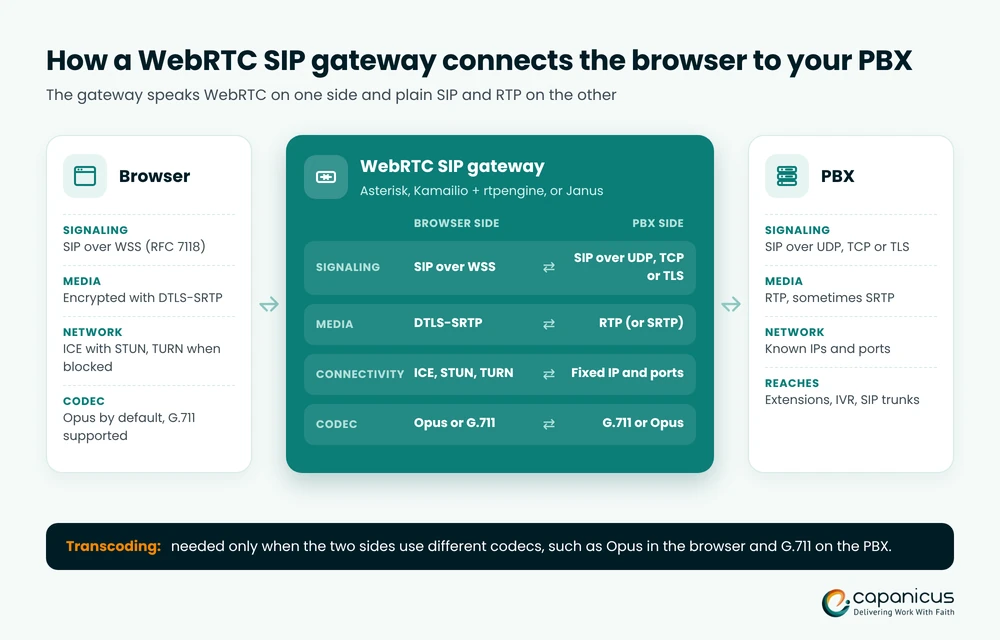
WebRTC and SIP are often mentioned together, but they solve different parts of a call.
WebRTC and SIP Do Different Jobs
SIP is responsible for setting up, modifying, and tearing down sessions. WebRTC specifies how browsers capture, encode, encrypt, and send audio and video, but it leaves signaling to the application. That gap is why a WebRTC-to-SIP gateway is needed.
What the Browser Requires
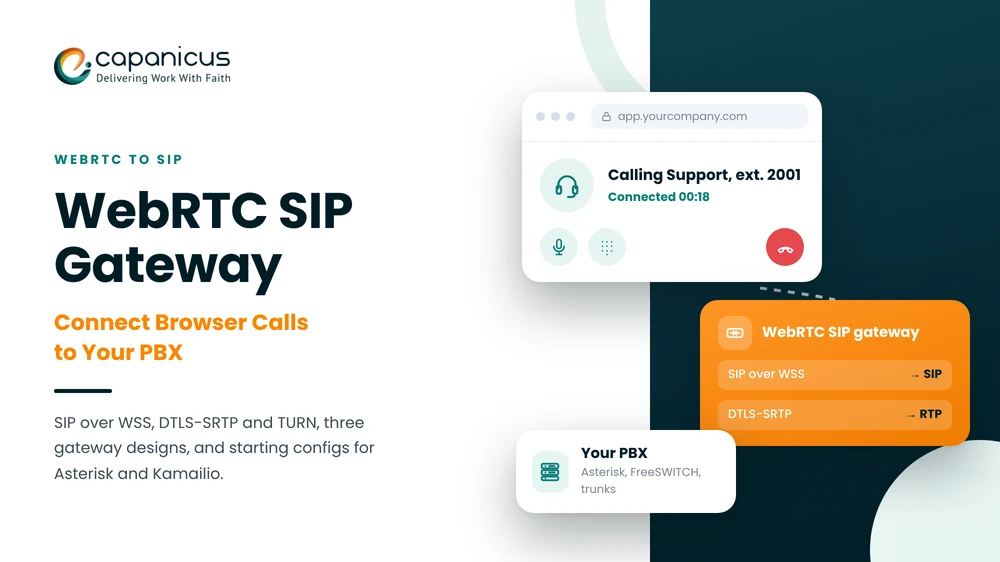
A browser cannot create a UDP socket for SIP signaling, so it uses a WebSocket over TLS. This is SIP over WebSocket as specified by RFC 7118. The media stream must be encrypted with DTLS-SRTP, and the connection is set up through ICE and STUN, sometimes with TURN. Most PBXs do not support all of this by default.
Where a Gateway Fits
The gateway terminates the browser’s WebSocket and encrypted media stream on one end and uses standard SIP/RTP on the other when communicating with the PBX.
How a WebRTC SIP Gateway Works Step by Step
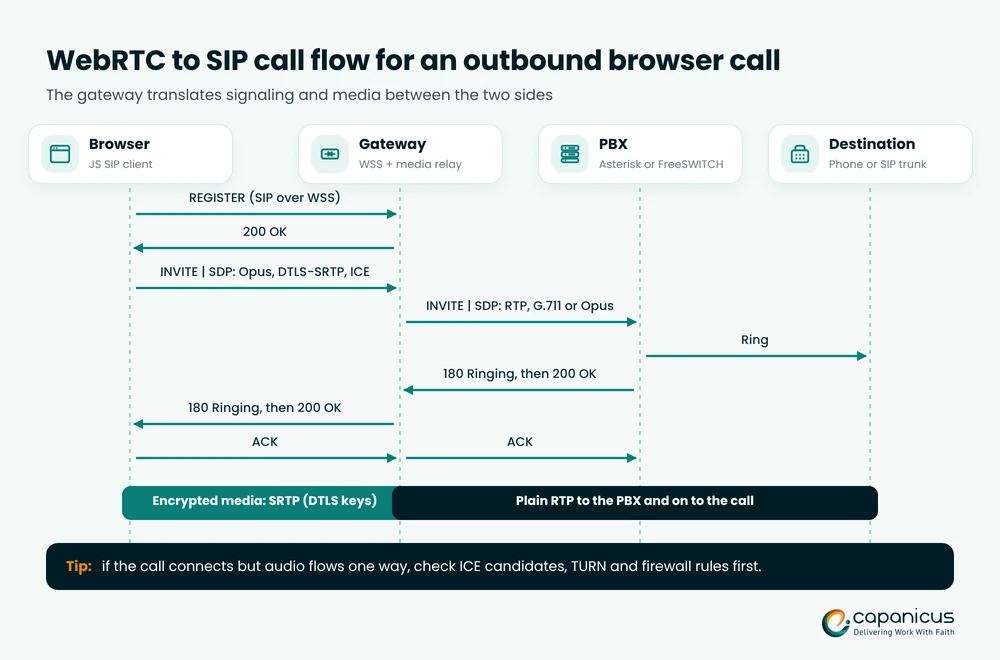
Every design handles the same three jobs: signaling, media, and connectivity; only where they run changes.
Signaling: SIP Over WebSocket
The browser opens a secure WebSocket (WSS) connection and uses a JavaScript SIP stack to send REGISTER and INVITE requests over it. The gateway passes these to the PBX as standard SIP, or the PBX accepts the WebSocket connection itself.
Media: DTLS-SRTP to RTP
The browser sends Opus-encoded audio over SRTP, with keys negotiated through DTLS. The gateway or media relay decrypts it and forwards plain RTP to the PBX, and does the reverse for the return audio. If the PBX does not support Opus, the browser can use G.711 instead, because RFC 7874 requires every WebRTC endpoint to support both. The relay only needs to transcode when the browser leg uses Opus and the PBX side uses G.711.
ICE, STUN and TURN
ICE gathers candidate addresses so the browser and the media relay can find a working path. STUN discovers public addresses, and TURN relays the media when no direct path works. Without TURN, users on restrictive networks may not connect at all.
Reading the Call Flow
In a typical outbound call, the browser sends an INVITE over WSS and the gateway sets up the media relay. The PBX then rings the destination, and audio flows both ways once the call is answered.
Three WebRTC SIP Gateway Designs Compared: Which Fits Your PBX
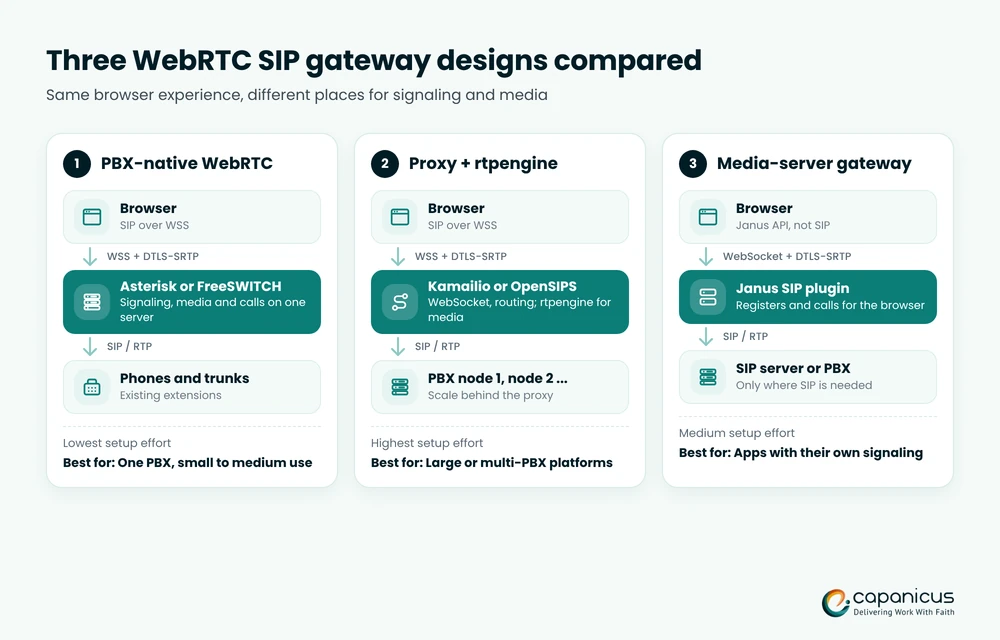
No single design wins. The right choice depends on the PBX you run, your expected load, and your team’s skills.
Design 1: PBX-Native WebRTC
Both Asterisk and FreeSWITCH can terminate WebRTC themselves. Asterisk does it through PJSIP with a WSS transport, and FreeSWITCH uses Sofia with WSS or its own Verto protocol. One system manages signaling and media, which keeps the architecture small, but call handling, transcoding, and registrations all compete for one server.
Design 2: Kamailio or OpenSIPS With rtpengine
In this design, the SIP proxy terminates the WebSocket connections and routes calls, while rtpengine manages DTLS-SRTP, ICE, and transcoding. This approach scales registrations well and lets you put several PBX nodes behind the proxy, but it adds more components to configure and monitor.
Design 3: Media-Server Gateway With Janus
The Janus SIP plugin registers with your SIP server on behalf of the browser and bridges its calls. The browser talks to Janus through the Janus API rather than SIP, so this design suits apps that already use their own signaling and only need SIP for some calls.
Comparison of the Three Gateway Designs
| Factor | PBX-native | Proxy plus rtpengine | Media-server gateway |
| Setup effort | Lowest | Highest | Medium |
| Registration scale | Limited by the PBX node | Strong, a proxy is built for it | Depends on your own design |
| Media and transcoding capacity | Shares PBX resources | Dedicated relay, scales separately | Dedicated media server |
| Operational complexity | Low | High | Medium |
| Best fit | Small to medium deployments on one PBX | Larger or multi-PBX platforms | Apps with custom signaling |
One PBX and a modest number of browser users? Start native. Several PBX nodes, many registrations, or heavy transcoding? Put a proxy and rtpengine in front. A product with its own backend logic and a few SIP connections? A media-server gateway can fit well. You can also move from a native setup to a proxy design later, because the browser still speaks SIP over WSS in both.
Configuration Starting Points for Asterisk and Kamailio
These snippets are starting points, not production configs. Check every option against the versions you run, and replace the placeholders.
Asterisk PJSIP With a WSS Transport
; http.conf
[general]
enabled=yes
bindaddr=0.0.0.0
tlsenable=yes
tlsbindaddr=0.0.0.0:8089
tlscertfile=/etc/asterisk/keys/fullchain.pem
tlsprivatekey=/etc/asterisk/keys/privkey.pem
; pjsip.conf
[transport-wss]
type=transport
protocol=wss
bind=0.0.0.0
[webrtc-user]
type=endpoint
context=from-webrtc
disallow=all
allow=opus,ulaw
webrtc=yes
dtls_auto_generate_cert=yes
auth=webrtc-user
aors=webrtc-user
[webrtc-user]
type=auth
auth_type=userpass
username=webrtc-user
password=CHANGE_ME
[webrtc-user]
type=aor
max_contacts=5
remove_existing=yesThe webrtc=yes option turns on the settings browsers need, such as DTLS-SRTP, ICE, and RTCP multiplexing, and dtls_auto_generate_cert=yes creates the certificate that DTLS needs. The WSS port also needs a certificate the browser trusts, or the WebSocket connection will fail.
Kamailio WebSocket Handling With rtpengine
loadmodule "tls.so"
loadmodule "sl.so"
loadmodule "xhttp.so"
loadmodule "websocket.so"
loadmodule "rtpengine.so"

modparam("rtpengine", "rtpengine_sock", "udp:127.0.0.1:2223")

# plus a TLS listener for WSS

event_route[xhttp:request] {
    if ($hdr(Upgrade) =~ "websocket" && $rm == "GET") {
        if (ws_handle_handshake()) { exit; }
    }
    xhttp_reply("404", "Not Found", "", "");
}

# Calls from the browser toward the PBX
rtpengine_manage("ICE=remove RTP/AVP rtcp-mux-demux replace-origin");

# Calls from the PBX toward the browser
rtpengine_manage("ICE=force RTP/SAVPF DTLS=passive SDES-off rtcp-mux-require generate-mid replace-origin");
The two rtpengine_manage lines belong in different branches of your routing logic, chosen by which side the request is heading to. Flag names vary between rtpengine versions, so confirm them in the documentation for yours.
Testing the Setup Before You Add Users
Register one browser client and call a test extension. Watch both the signaling in your logs and the media in the browser’s WebRTC stats. If you hear one-way audio, check ICE, TURN, and firewall rules first, because they are the usual cause.
Problems That Break Browser Calls: NAT, Codecs and Scale
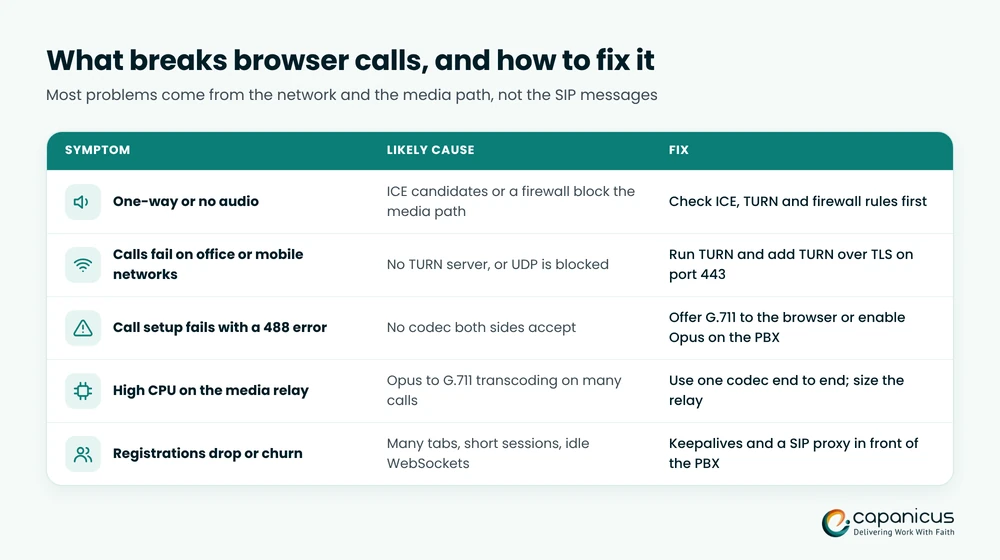
Most production issues come from the network and the media path, not from the SIP messages.
NAT and the Case for TURN
Browsers sit behind home routers, office firewalls, and mobile networks. STUN works in many cases, but not all. Run your own TURN server, open the ports it needs (including TURN over TLS on port 443 for strict firewalls), and test from a restrictive network, because that is where users usually report problems.
Opus, G.711 and Transcoding Load
Browsers prefer Opus, while most SIP trunks and older PBX systems use G.711. A call needs transcoding only when the two legs use different codecs, and transcoding costs CPU. Use Opus end to end where the PBX supports it, offer G.711 to the browser where it does not, and size the relay for any transcoding that remains.
Registration Scale and Keepalives
Each open browser tab holds its own WebSocket connection and registration. Short sessions and reconnect attempts create heavy churn that most PBXs were not designed for. Use keepalives so connections survive proxies and load balancers. Once registrations grow, put a SIP proxy in front of the PBX.
From Gateway to Browser Softphone and Click-to-Call Widget
The gateway is the plumbing. The browser softphone is what users actually see.
Choosing a Client Library
Many implementations use an open-source JavaScript SIP client such as SIP.js or JsSIP and build their own interface around it. Pick a client that is actively maintained and works with your gateway’s WebSocket setup and codecs.
Building a Click-to-Call Widget
A click-to-call widget is a small browser softphone with a single button. It needs microphone permission, call state handling, and a way to pass context to the agent, such as the page the customer was viewing.
Securing Browser Credentials and Calls
Credentials should be short-lived and never shipped in the page itself. Have your backend issue them after the user signs in. Then limit what browser endpoints can dial, for example with a dedicated dialplan context such as from-webrtc, so a leaked credential cannot be used for toll fraud.
Capanicus Examples: Contact Center Architecture and Browser WebRTC
Our VoIP contact center architecture shows SIP, RTP, and WebRTC working together in one system. The Meetn case study covers a browser-based WebRTC video conferencing and webinar platform. Together, they cover both sides of this guide: the SIP and PBX side, and the browser side.
Final Thoughts on Choosing a WebRTC SIP Gateway
The right WebRTC SIP gateway lets browser-based calling apps join your existing PBX and telephony setup. Whether you choose native WebRTC, a SIP proxy with rtpengine, or a media-server gateway such as Janus depends on your PBX, call volume, and team.
After the initial setup, reliable browser calling depends on NAT traversal, TURN connectivity, codec choices, and registration management. Testing these on real networks helps you avoid common problems such as failed connections and one-way audio.
With proper gateway configuration, enterprises can expand their telephony system with web applications without implementing a completely new communication infrastructure. Capanicus helps companies design and build VoIP and WebRTC solutions that connect browser-based communication with existing telephony systems.
Talk to our team about connecting browser calls to your PBX.
Frequently Asked Questions
1. What is a WebRTC SIP gateway?
A WebRTC SIP gateway enables communication between a WebRTC-based calling application and a SIP-based PBX or telephony system. It translates WebRTC signaling and media to SIP and RTP.
2. Why is a gateway needed to connect WebRTC with a PBX?
Modern browsers implement WebRTC technology, whereas conventional PBX solutions usually require SIP signaling and RTP media. A WebRTC SIP gateway handles WebSocket signaling, encrypted media, connectivity, and protocol translation between the two.
3. What are the different types of WebRTC SIP gateways?
There are three popular ways to set up a WebRTC SIP gateway: native WebRTC support in a PBX solution; using a proxy (like Kamailio or OpenSIPS) with rtpengine; or using a media server gateway (for example, Janus).
4. Can WebRTC connect directly to an Asterisk PBX?
Yes. Asterisk accepts browser connections through PJSIP over WebSocket Secure (WSS) and supports WebRTC requirements such as ICE and DTLS-SRTP.
5. What is the role of STUN and TURN in WebRTC calling?
STUN helps browsers discover their public-facing network addresses, while TURN relays media when a direct connection cannot be established. TURN is particularly useful for users behind restrictive firewalls, NATs, or networks that block direct media connections.
6. Which WebRTC SIP gateway architecture is best for scalability?
A SIP proxy such as Kamailio or OpenSIPS combined with rtpengine is often suitable for larger deployments. It separates signaling and media handling from the PBX, which allows registrations, media relays, and PBX nodes to scale independently.