Quick Summary
- 1Why a phone system that worked last year starts failing as your team grows
- 2Eleven challenges behind dropped calls, broken audio and slow screens, each with a fix you can act on
- 3How to find your limit before your customers do
You walk across your sales floor on the busiest Monday before the festive season when an agent holds up her headset and tells you the customer on her call cannot hear a single word. You check the dashboard, and every indicator is green. Within minutes, more agents raise their hands, and the customers who stop replying are the ones you spent weeks and a full campaign budget to win.
Surprisingly, nothing went wrong in any setting; it was the system that hit a limit nobody had measured. This guide explains everything about VoIP scalability, the challenges that slow down growing businesses, and what you can fix before your next busy day.
But before you can address it, you need to see why this happened. That starts with why VoIP scalability matters more with every agent, campaign and office you add.
Why Does VoIP Scalability Matter More as Your Business Grows?
Every stage of growth adds load to a system that was sized for a smaller company. Fortune Business Insights values the global VoIP market at about USD 195.39 billion in 2026, which shows how many businesses now depend on this technology for their daily conversations. The cost of failure is also high, because ITIC’s 2024 survey found that for more than 90 per cent of mid-size and large companies, a single hour of downtime costs over USD 300,000.
This happens because of the challenges your system faces as it grows. Each one gets a little worse every week without being noticed, until the load crosses the limit and calls start to fail. The next sections show where these limits sit and how to fix each one.
Which VoIP Scalability Challenges Slow Down Growing Businesses, and What Fixes Them?
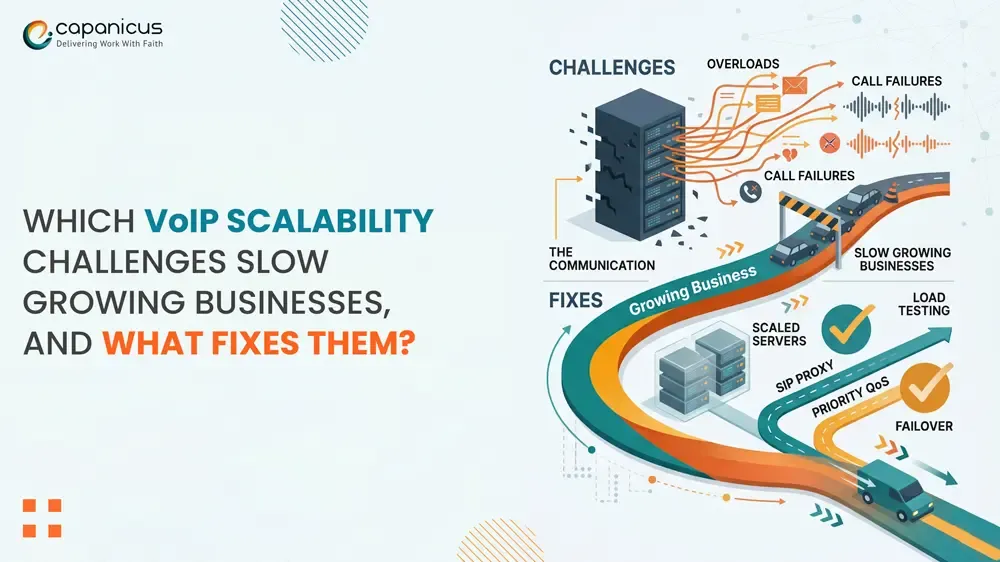
These eleven VoIP scalability challenges appear inside the system, which is where growing businesses lose the most time, and each one comes with a fix you can start this quarter.
Why Do Calls Start Failing When Your Call Volume Crosses a Certain Point?
A system that handled 100 calls comfortably on a quiet day can behave very differently with 1,000 calls on a campaign day. Many phone systems still run on settings chosen at installation and never tested against real traffic, so when active calls cross a limit that nobody has seen, new calls are rejected or dropped.
What it looks like:
- Calls drop when traffic reaches a certain level.
- Customers hear a busy tone or a “service unavailable” message during campaigns.
- Inbound calls work while outbound calls fail.
Consider a business that started with 25 agents, whose installer sized the server for 40. Eighteen months later it has 90 agents, three new campaigns, a CRM connected to every call and recording switched on, and each addition looked small when it was made. Together they asked the same server to do about four times the original work.
The cause is usually configuration and not hardware. Limits on processes, open connections and memory were set for the company you were, and nobody raised them as you grew.
How to fix it:
- Find the real limit with a load test on a quiet day.
- Raise the system limits to match the call volume you expect in the next year.
- Keep at least 30 per cent spare capacity at your busiest hour.
- Set an alert when peak calls reach 60 to 70 per cent of the tested limit.
Raising limits is the quickest gain in VoIP scalability, because it costs little and takes days, not months. Buying a bigger server without these steps only moves the problem a few months ahead.
What Happens When One Server Carries Every Call?
A single server is simple to run, which is why most businesses begin with one. It also means that a restart, a software fault or a power cut takes every call down together, including the calls already in progress.
That one server does two different jobs. Signalling sets up and ends calls, and media carries the voice itself, so both jobs compete for the same processor and memory. As calls increase, setup becomes slower first, and you notice it as a pause after dialling, before the phone rings.
How to fix it:
- Separate signalling and media onto different servers, so each can grow on its own.
- Run at least two servers for each job, so one can take over when the other fails.
- Keep registrations and call data outside the call servers, so any server can handle any call.
- Test failover every quarter by switching one server off on purpose.
A scalable VoIP system treats failure as a normal event and plans for it. If a server fails while 200 calls are active, the second server must accept new calls immediately and should already know which phones are registered where. Without that shared information, the standby starts from zero, every phone registers again, and the registration storm described below begins at the worst moment.
A backup that has never been tested also tends to carry an outdated setting that appears only during the first real failure.
Why Does Your System Slow Down Every Time Everyone Logs In?
Every IP phone and softphone tells the server where it is by sending a registration request every few minutes. With 30 users, this traffic is invisible, but with 800 users, after a power cut or at a shift change, every device registers again within the same minute.
This wave is called a registration storm, and it keeps a healthy server busy while real calls wait. Contact centres feel a smaller version of it every day, because most agents log in within the same ten minutes.
How to fix it:
- Put a SIP proxy or load balancer in front of your call servers, with open-source tools such as Kamailio or OpenSIPS, so that registrations are received in one place and spread across several servers.
- Lengthen the registration interval where phones allow it.
- Stagger login times for large shifts, so the system never receives the whole team at once.
- After an outage, bring servers back one at a time and not all together.
Why Doesn’t Adding More Servers Add More Capacity?
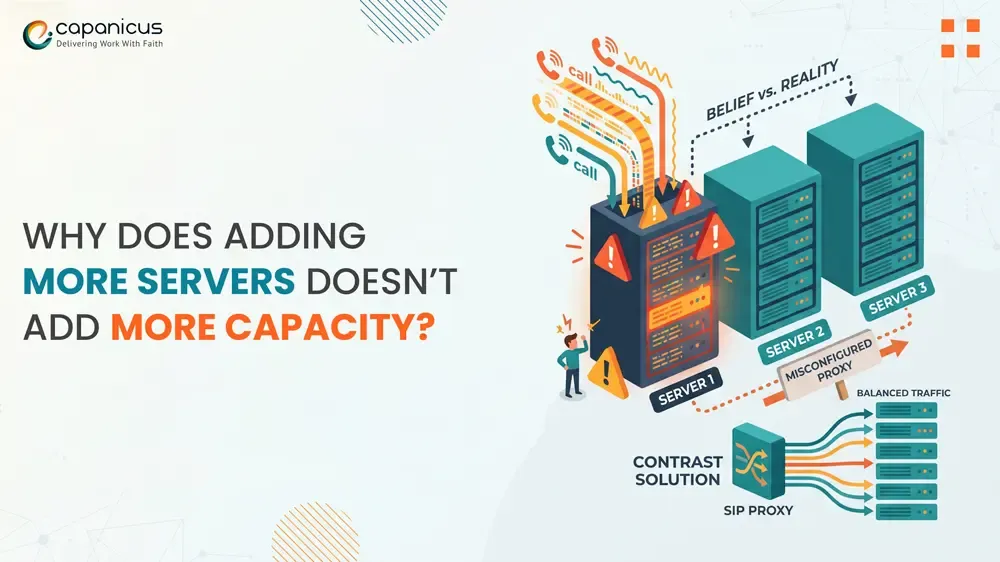
Many teams assume that two servers carry twice the calls. The reality is more complicated, as these three common beliefs show:
- Belief: a second server doubles capacity. Reality: if traffic still lands on the first server, the second one sits idle.
- Belief: DNS round robin spreads calls evenly. Reality: many phones remember the first address they receive and keep using it.
- Belief: capacity equals the number of servers. Reality: capacity depends on how traffic is shared between them.
Real VoIP platform scalability comes from how traffic is shared and not from how many servers you own.
How to fix it:
- A SIP proxy that sends each call to the server with the most spare capacity
- Automatic health checks that remove a failed server from rotation within seconds
- Calls from one conversation kept on the same media server
- New servers added to the layer that is actually full
Consider a team that adds a third server before a campaign and sees no improvement. The usual cause is that the proxy in front still sends most calls to the first server, so the new one carries only a small share of the load. Reading the share of traffic each server receives for one afternoon shows this in minutes.
How Does Call Routing Become Difficult With More Teams and Locations?
A business with one office needs a simple plan where every call goes to one group. A growing business adds sales, support, billing, regional teams and a second office, and each team needs its own rules for working hours, language, priority and overflow.
When all those rules are written by hand inside one large configuration, every change carries a risk. A small edit to the support queue can send sales calls to the wrong team, and nobody finds out until a customer complains. Routing is also where VoIP platform scalability becomes visible to customers, because a wrong transfer is felt immediately, while a slow server is felt only as a small delay.
How to fix it:
- Keep the rules of each team in one place.
- Store routing rules in a database, so adding a team means adding a record and not rewriting the plan.
- Test every routing change on a copy of the system before it goes live.
- Keep a simple log of who changed which rule and when.
Why Do Call Records and CRM Screens Slow Down at the Busiest Hours?
Every call creates a record, and every integration reads or writes it. At low volume, these small actions finish in milliseconds, but at high volume they queue behind one another. The agent then sees the customer profile three seconds after the call has started, routing lookups time out, and billing records arrive late.
At 20 calls an hour, writing a record after each call is invisible. Even 2,000 calls an hour is only about 0.6 calls a second, which an ordinary database handles easily on its own. The trouble starts when routing lookups, CRM updates, call logs and reports all share that same database, because the slowest query then decides how fast the next call connects.
This feels like a slow phone system even when the voice path is perfectly healthy, which is why teams often look for the cause in the wrong place.
How to fix it:
- Write call records in batches through a queue and not one by one.
- Keep frequently used lookups, such as customer profiles and routing rules, in a cache.
- Give call records their own database, separate from the one that routes calls.
- Design every integration so that a slow CRM never blocks call setup.
- Keep indexes on call record tables to the few you need, because every extra index slows each write, and split large record tables by date.
Why Does Call Audio Break Up as More People Join?

Voice quality depends on your network as much as on your server. Many offices upgrade the internet plan and still hear broken audio, because the real cause is jitter or packet loss and not raw speed. Jitter is the variation in the time each voice packet takes to arrive, and when it rises, words reach the listener unevenly, and the speech sounds robotic.
Think of the network as a road with a fast lane for voice. Without that lane, one large email attachment in the accounts department can make a sales call hard to follow.
Network quality is one part of VoIP scalability that software upgrades cannot fix on their own.
How to fix it:
- Give voice its own priority lane using quality of service rules and a separate VLAN, so a large file download never competes with a customer call.
- Keep the voice path direct, and send audio through extra servers only when recording, conferencing or transcoding needs it.
- Size media servers by the number of audio streams and not the number of calls, because a recorded or conference call carries more than one stream.
Targets that keep a conversation natural:
- One-way delay below 150 milliseconds
- Packet loss below 1 per cent
- Jitter below 30 milliseconds
How Do Recording and Transcoding Quietly Use Up Server Power?
Two features use far more capacity than most teams expect:
- Transcoding: the server translates between voice codecs in real time when the two sides of a call do not match
- Call recording: audio is written to disk for every recorded call and often sent on to a transcription or analytics tool
A recorded call that is also transcoded asks the server to translate the audio, write it to disk and send it on for analysis, all while the conversation continues. A server that handles 100 plain calls may handle far fewer when each call is recorded and transcoded, and AI features such as live transcription raise the load again. Of all VoIP scalability challenges, this one surprises teams most, because it appears after features are switched on and not after users are added.
How to fix it:
- Agree on a small set of voice codecs across phones and carriers, so calls rarely need translation.
- Move recording and analysis to separate machines.
- Give transcoding its own servers when it cannot be avoided.
- Watch the number of active transcoding sessions, so you add capacity before quality drops.
What Happens to Your Costs When Every New Agent Adds Another Licence?
Many hosted platforms charge per user, per channel or per feature. This feels fair at the beginning and becomes expensive when headcount doubles, because the cost rises in a straight line while the revenue each agent brings may not. Some licensed systems also tie capacity to specific hardware, so growth means buying a new unit, waiting for delivery and booking a maintenance window, and the waiting can cost more than the equipment.
How to fix it:
- Ask for the price of each additional hundred users, in both money and effort, before you commit to growth.
- Check whether capacity is limited by licence, by hardware or by design.
- Compare the three-year cost of a per-seat plan with a platform you own and can extend.
- Prefer systems where adding capacity means adding servers and not replacing them.
A scalable VoIP system gives you this clarity before growth starts, which lets you plan budgets with confidence.
How Do Security and Toll Fraud Risks Scale With Your Call Volume?
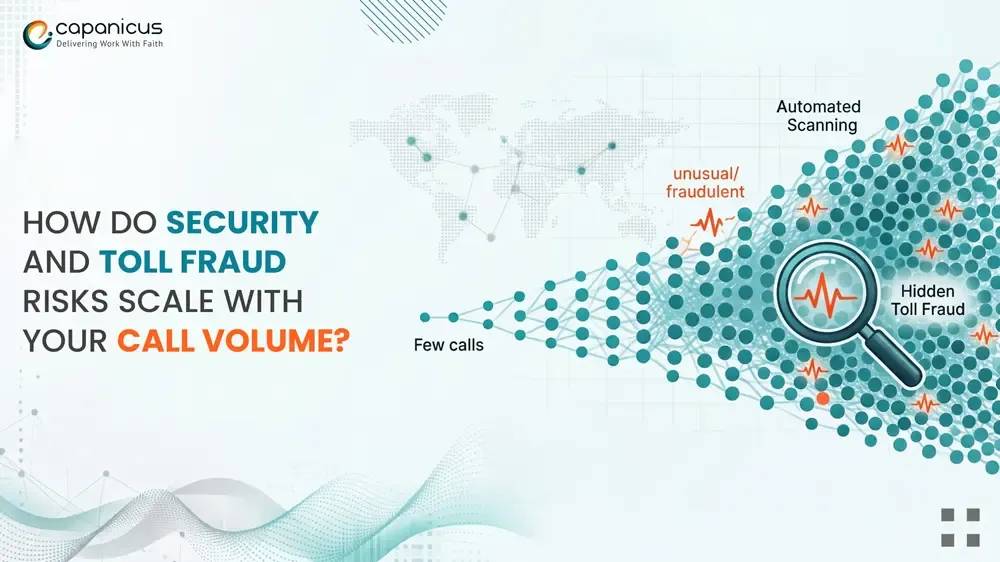
A public SIP port attracts automated scanning within hours of going online, and toll fraud becomes harder to spot as call volume grows, because a few hundred unusual calls hide easily among thousands of normal ones. Security is part of VoIP platform scalability too, since a protection that works for 20 extensions is rarely enough for 2,000.
How to fix it:
- Set automatic rate limits on SIP requests.
- Allow only trusted carriers and offices through IP allow lists.
- Raise alerts for unusual dialling patterns, such as many night-time calls to the same international prefix.
- Set spending limits per account, so one compromised extension cannot run up a large bill.
- Apply recording consent, retention and storage rules per team or region, because they differ by country.
Why Does a Missing Monitoring and Test Plan Turn Small Issues Into Outages?
A system without monitoring is inspected by your customers, and they report problems only after they have already been affected. Each of the earlier VoIP scalability challenges becomes cheaper to fix when monitoring finds it early.
What to track every day:
- Peak concurrent calls
- Call setup time
- Share of calls answered
- Jitter and packet loss
- MOS score, which rates call quality from 1 to 5, where anything below 3.6 means many listeners are dissatisfied
Set an alert for each number, so your team hears about a problem before your customers do. Plan capacity before you need it, because when the daily peak reaches 60 to 70 per cent of your tested limit, the next step should already be underway, since building capacity takes longer than most teams expect.
How to fix it:
- Run a load test that copies your real traffic, with a registration wave like a morning login, a steady stream of calls like normal hours, and a short spike like a campaign launch.
- Switch on recording and your CRM integration during the test, because these usually reduce capacity.
- Note where call setup time or audio quality starts to worsen, since that point is your practical limit.
- Repeat the test after every major change, such as a new campaign or a newly connected tool.
What Does a Scalable VoIP System Look Like When These Fixes Come Together?
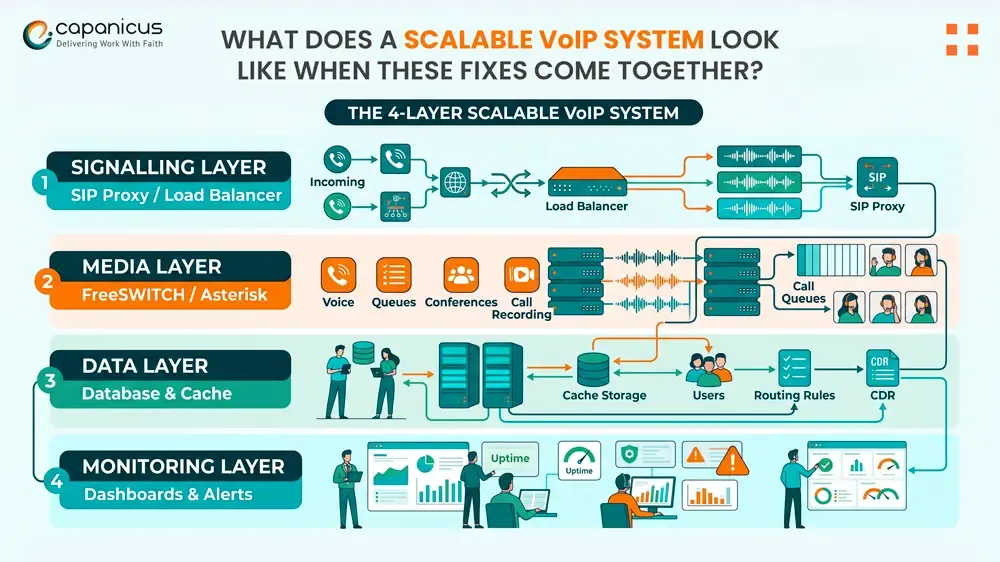
Each fix above belongs to one of four layers, which is why fixing them in order gives lasting results and not temporary relief. A scalable VoIP system keeps its work in four separate layers, so each layer can grow without disturbing the others:
- Signalling layer: a SIP proxy or load balancer receives registrations and call requests
- Media layer: servers such as FreeSWITCH or Asterisk handle voice, queues, conferences and recordings
- Data layer: a database and cache hold users, routing rules and call records
- Monitoring layer: dashboards and alerts show pressure building before customers feel it
Cloud hosting and containers make adding servers quicker, yet the principle holds on physical machines too: no single part should be a place where every call must wait.
How Can Capanicus Help You Improve VoIP Platform Scalability?

Growth should feel like good news for your phone system, and it should not feel like a risk. At Capanicus, we design and build VoIP platforms on Asterisk and FreeSWITCH, with SIP routing, CRM integration and monitoring planned around the number of users you expect next year. We start with a review of your current setup, find the limit that will appear first, and recommend the smallest change that removes it.
If your calls already show the signs described above, or if a large campaign or expansion is coming, a short conversation with our team can save you weeks of guesswork. Share your current numbers with us, and we will help you plan a scalable VoIP system that grows at the same speed as your business.
Questions Growing Businesses Ask Us
1. What is VoIP scalability?
VoIP scalability is the ability of a calling system to handle more users, simultaneous calls and locations without losing call quality. A scalable system adds capacity in small steps, so growth does not require a full replacement.
2. How many concurrent calls can a VoIP server handle?
The number depends on the voice codec, whether calls are transcoded or recorded, and the hardware in use. A published figure from another company rarely matches your setup, so a load test on your own system gives the only reliable answer.
3. Does moving to the cloud make a VoIP system scalable?
Not by itself. The cloud makes adding servers faster, but a single-server design moved to the cloud keeps the same ceiling. The architecture decides how well a system scales, and hosting only decides how quickly you can add capacity.
4. How often should you load test a VoIP platform?
It’s recommended to test before every major campaign, expansion or new integration, and at least twice a year even when nothing changes. Each test shows how much spare capacity remains and which part will reach its limit first.