Cloud PBX migration moves a company’s phone system from locally installed equipment to a hosted cloud PBX (Private Branch Exchange) platform. A traditional on-premises PBX usually relies on physical servers, telephone lines, network equipment, and in-house maintenance. A cloud PBX runs in a hosted environment instead. Employees can make and receive calls on IP phones, computers, browsers, or mobile devices. In short, the whole phone system moves from a local PBX to a hosted service, usually delivered over the internet. The business keeps its calls and meetings running as before, but the cloud now handles them.
If you plan to move to cloud PBX, this guide will help. It covers the cloud PBX migration steps, an on-premises PBX to cloud migration plan, and a cloud PBX migration checklist. It also outlines common PBX migration challenges and best practices to reduce disruption.
Use the following checklist to make sure you cover every essential step of a successful cloud PBX migration.
Cloud PBX Migration Checklist
- Audit the Existing PBX System: Review the current PBX setup and document all phone numbers, devices, extensions, and call flows.
- Identify Business Requirements: Define business, technical, security, and compliance requirements, including integrations with external systems.
- Choose a Migration Strategy: Decide whether a complete, phased, or hybrid migration approach best suits your needs.
- Assess Network Capacity: Check bandwidth, latency, jitter, and packet loss to ensure reliable call quality.
- Select a Cloud PBX Provider: Choose a suitable service provider or migration partner.
- Plan Number Porting and Device Compatibility: Arrange telephone number porting and verify device compatibility.
- Configure the Cloud PBX: Set up users, extensions, menus, queues, voicemail, and call-routing rules.
- Integrate Business Systems: Connect the cloud PBX with CRMs, billing solutions, help desks, and other business systems.
- Conduct a Pilot Migration: Test the new system with a limited number of users before proceeding with the full migration.
- Train Employees and Monitor Performance: Train employees, complete the rollout, and track system performance after go-live.
Why Do Companies Switch to Cloud PBX?
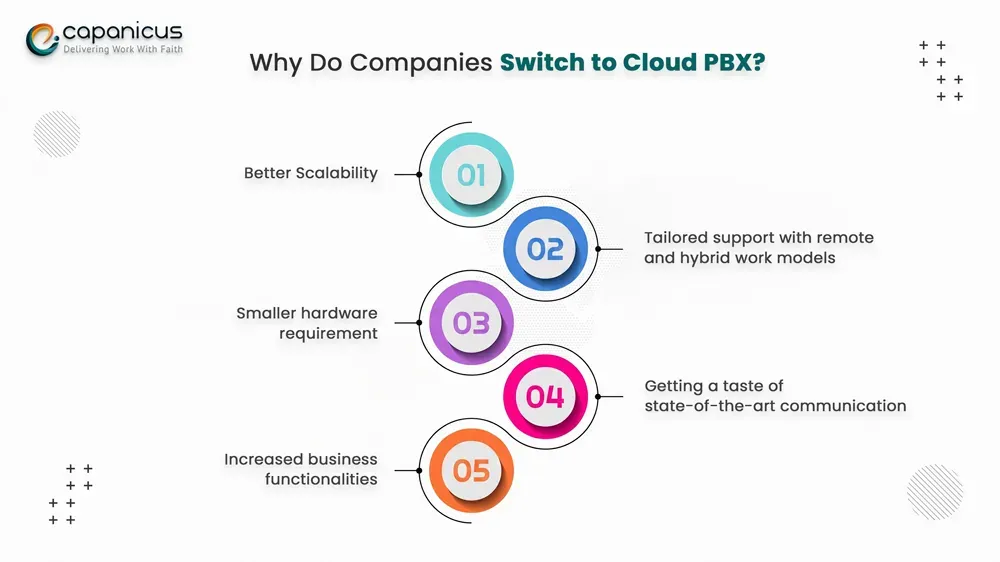
Better Scalability
When an office phone system reaches its user limit, you need more hardware, licenses, phone lines, or support staff. With a cloud phone system, an administrator simply adds users and extensions through a web portal. This helps businesses that hire often or run several offices. It also suits teams with remote staff, seasonal call volumes, or a need for temporary users and numbers.
Support for Remote and Hybrid Work
Cloud-hosted phone systems let workers use company numbers from any location. Employees can take calls on an office phone, a desktop app at home, or a mobile app on the move.
Less On-Site Hardware
Traditional, self-hosted phone systems rely on company servers, equipment upkeep, software updates, and physical storage facilities. A cloud phone system reduces the core telephony infrastructure a company has to manage on-site. Companies still need compatible handsets, network upgrades, backup internet, technical support, and software licenses. However, managing the core phone infrastructure becomes much simpler.
Modern Calling Features
Cloud PBX platforms typically include:
- Auto-attendants and interactive voice response.
- Call queues and ring groups.
- Call forwarding with voicemail-to-email functionality.
- Call recording as well as call analytics.
- Business texting.
- Mobile and desktop softphones.
- Conference calling and call monitoring.
- CRM integration.
Better Integration with Business Tools
A cloud phone system can sync call activity with your other business tools. Once you set it up:
- Customer information appears when the phone rings.
- The system creates call logs automatically.
- It creates follow-up tasks for calls and messages.
- It saves call records under the right customer account.
Cloud PBX Migration Steps
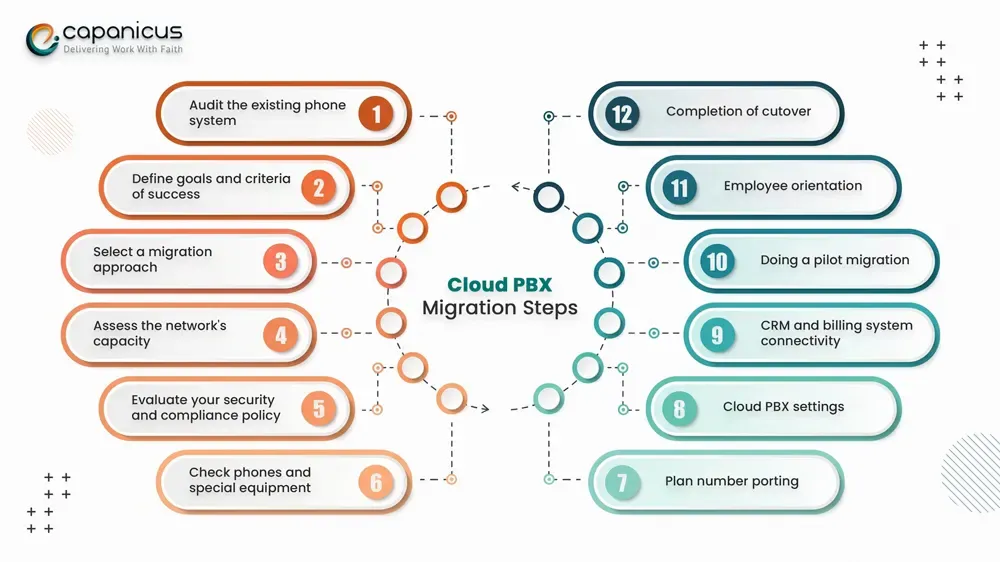
Step 1: Audit the Existing Phone System
Start by taking a full inventory of your current phone system. Record your main and direct numbers, extensions, departments, locations, auto-attendants, queues, ring groups, schedules, and voicemail. Also record forwarding rules, phones and analog devices, carrier contracts, CRM integrations, billing systems, and reporting requirements.
Step 2: Define Goals and Success Criteria
Knowing what a successful migration looks like is a good way to keep it under control. Your reason for switching might be to support remote employees, rely less on physical equipment, or improve call distribution. Other aims include Salesforce or vTiger integration, simpler service provisioning, custom billing, and stronger disaster recovery. Turn these goals into measurable criteria so you can check the quality of the work after the migration.
Step 3: Choose a Migration Approach
A complete migration moves all services at once. A phased migration moves users or locations gradually. A hybrid migration keeps certain services on-premises while other users move to the cloud. The right choice depends on your system complexity, risk tolerance, legacy equipment, business continuity needs, and similar factors.
Step 4: Assess Network Capacity
A major factor limiting the successful use of VoIP is how well the local network can support it. Check that your bandwidth and upload capacity meet VoIP’s requirements. Then review latency, jitter, packet loss, Wi-Fi, firewall behavior, and VLANs. Also check routers, switches, power over Ethernet, and internet redundancy. Set up quality of service (QoS) so voice traffic gets priority over the rest of your network traffic. Test during peak traffic hours, because a network that works when quiet may fail when busy.
Step 5: Review Security and Compliance
Basic security steps include strong administrator passwords, multi-factor authentication, and role-based permissions. Also restrict international calling and use toll fraud monitoring, spending limits, secure API authentication, and encryption wherever needed. Make sure you cover both general data-protection rules and industry-specific requirements, such as HIPAA for telehealth apps.
Step 6: Check Phones and Special Equipment
Your existing IP phones may or may not work with the new platform. It depends largely on the model, firmware, provisioning, codecs, security settings, licensing, and provider restrictions. Also identify and test fax machines, alarm systems, elevator phones, paging systems, door-entry systems, payment terminals, and emergency phones.
Step 7: Plan Number Porting
To port numbers to a new carrier, you usually need carrier details, the account number, and the service address. You also need authorization contacts, a recent invoice, the number list, and a letter of authorization. Start early so you don’t lose service during the changeover. Keep the old service running until the port is complete. After the port, test calls from different carriers and locations.
Step 8: Configure the Cloud PBX
Set up users, extensions, departments, locations, caller ID, auto-attendants, ring groups, and queues. Then configure hold music, business hours, holidays, voicemail, forwarding, recording, apps, emergency locations, permissions, and reports. Rebuild your core call flows first, before making big changes.
Step 9: Connect CRM and Billing Systems
Through APIs and webhooks, a cloud PBX can support CRM integration and billing features. These include click-to-call, caller ID, screen pops, call logging, recording links, and follow-up tasks. They also cover lead updates, ticket creation, data sync, and usage reporting.
Step 10: Run a Pilot Migration
Pick a mix of test users: an administrator, salesperson, support agent, remote employee, manager, mobile user, and meeting-room user. Ask them to do realistic tasks and note any problems before you go ahead with the full rollout.
Step 11: Train Employees
Cover the essentials of logging in, making, and handling calls. Train support agents on transfers, hold, voicemail, availability status, call forwarding, texting, conference calls, CRM functions, and reporting problems. Train administrators on user management, call routing, permissions, reports, integrations, and escalation procedures.
Step 12: Complete the Cutover
Create a cutover runbook with the timeline, contact person, provider contacts, and porting status. Add tests, approval stages, rollback criteria, and backup routes. Right after go-live, check everything: numbers, menus, queues, transfers, voicemails, recording, emergency calling, CRM logging, and billing. Keep the old PBX until you finish acceptance testing.
Common Cloud PBX Migration Challenges
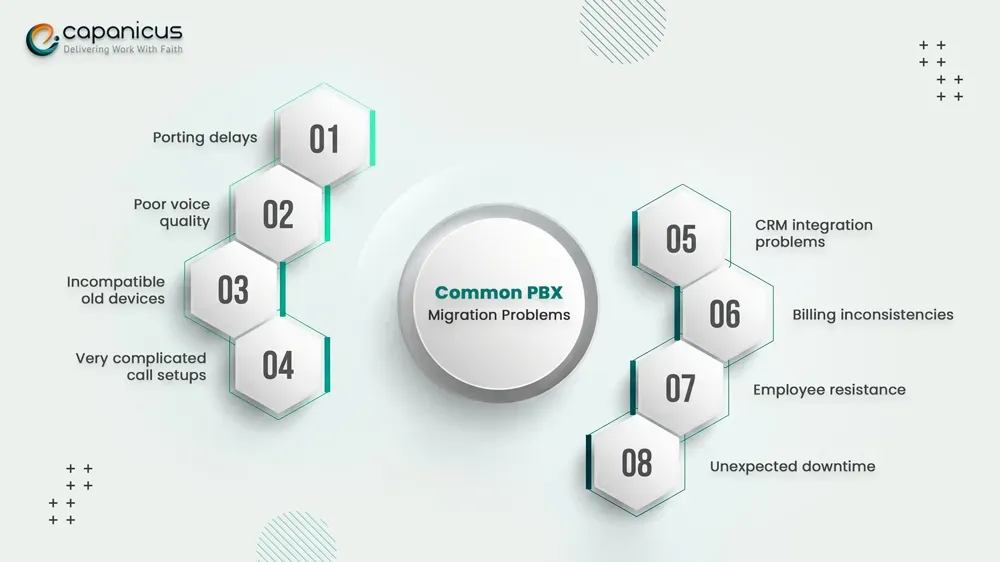
Porting Delays
Numbers can fail to port because of wrong account details, a mismatched service address, missing authorization, or carrier restrictions. Each of these causes delays. Don’t wait until the last moment. Prepare the documents in advance and keep the old line active until the migration is complete. Forward calls through the new service and test every number.
Poor Voice Quality
Distorted audio, echo, delay, and dropped calls can result from internet congestion, poor Wi-Fi, or incorrect QoS settings. Use the test phase to find voice traffic bottlenecks and improve your Wi-Fi setup. Keep monitoring call quality once the system goes live.
Incompatible Legacy Devices
Older handsets, payment terminals, and alarm units may not be compatible with the new system. First, make an inventory of these devices, then verify each one. Test compatibility, and use adapters or separate services where needed.
Complex Call Flows
Call flows can be hard to recreate. Menus change over the years, and forwarding rules, holiday calendars, and department-level exceptions pile up. Draw call-flow diagrams, involve managers, and test every option thoroughly.
CRM Integration Problems
An integration might appear active but not be able to log calls or match customers correctly. Test inbound and outbound calls, identity matching, timestamps, recordings, missed calls, and API logs.
Billing Inconsistencies
Standard billing might not be flexible enough to handle custom rates, reseller structures, balances, destination charging, or complex usage rules. Document your current billing logic and test changes with sample records. Compare the results with manual calculations, and customize A2Billing or MOR if needed.
Employee Resistance
If employees struggle to work with the new system, they may resist it. Involve users in the pilot and act on their feedback. Explain why the change helps and offer friendly training. Publish quick guides and keep support available when needed.
Unexpected Downtime
If you switch off the old system too early with no alternate routing, you risk downtime. Keep the legacy system available as long as needed and pick a low-volume time for the cutover. Set clear rollback conditions in case things go wrong, and be ready to use alternate numbers.
Cloud PBX Migration Best Practices
- Document the current system before you start anything else, so you have a full reference.
- Start with a pilot or a phased rollout.
- Judge success by the real user experience, not only by whether the phone system works.
- Don’t combine the migration with later optimization work.
- Keep a documented rollback plan at all times.
- Use strong passwords and limited access rights for the admin area.
- Keep monitoring call quality and queue wait times.
How Capanicus Can Help with VoIP and Cloud PBX Solutions
Capanicus primarily deals with software development and focuses on delivering VoIP, PBX, and communication software solutions. We help enterprises implement or customize cloud PBX solutions that meet their communication needs. The result is more flexibility and better control over incoming and outgoing calls. Planning a cloud migration or a new communication platform? Our team can help you choose the right technology.
Looking for a VoIP or cloud PBX solution? Contact Capanicus and share your project details.
Conclusion
Most migrations run into the same issues: delayed number porting, slow networks, incompatible phones, and complex call routing. Misconfigured CRM integrations, billing errors, employee resistance, and unplanned downtime are also common. A successful cloud PBX migration is more than a change in technology. It also affects customer service, employee productivity, billing, sales, remote work, and business continuity.
To reduce risk, focus on six things. First, document your existing system in detail. Second, define exactly what you need. Third, prepare your network. Fourth, test your equipment. Fifth, plan number porting. Sixth, run a pilot phase. Most importantly, train employees well so they can use the new system without disruption. Finally, keep a fallback, such as the original phone system, in case you need to roll back.
Frequently Asked Questions
What is cloud PBX migration?
Cloud PBX migration is the process of moving a business phone system from on-site hardware to the cloud. The process can also involve number porting, call-flow configuration, device setup, integration of business applications, training, and post-launch support.
How do you do cloud PBX migration?
Review your current system, list your requirements, test your network, and choose a suitable platform. Next, plan number porting, configure the system, and integrate your business applications. Finally, launch with a first group of users, train everyone, and carry out a controlled cutover.
How long is the whole cloud PBX migration process?
It depends on the number of users, locations, numbers, devices, call flows, integrations, and the testing involved. A small migration can take a few business days, while a large multi-location deployment may take weeks.
Can migration to cloud PBX result in downtime?
Careful planning keeps downtime to a minimum. However, any cutover carries some risk of disruption. To reduce that risk, keep the old system active and use backup routes. Test number porting in advance and schedule the cutover for a quiet period.
Is it possible to reuse my old IP phones?
You can reuse certain IP phones if they meet the provider’s firmware, configuration, security, codec, and license requirements. Otherwise, older phones may need a firmware update or replacement.
What happens to fax machines and alarm systems?
Analog devices may need an adapter or a separate service. Make sure you identify and test every device before the move.
What billing options can Capanicus customize for carriers?
Capanicus offers customization of both A2Billing and MOR to fit rates, usage tracking, accounts, and prepaid/postpaid billing.
How does Capanicus connect phone systems with Salesforce or vTiger?
Capanicus can integrate phone systems with Salesforce and vTiger. This enables click-to-call, caller details during the call, and automatic call logging. It can also update customer history and link support cases to previous calls.